A Discord free games bot watches the PC stores for game giveaways and posts each new one into your server. SaqrBot now does exactly that: pick a channel, tick the stores you care about, and every free game from Steam, Epic Games, GOG, Ubisoft, itch.io and more shows up as a card with the normal price struck through, a live countdown, and a button that opens the offer.
What the Free Games Post Contains
Each giveaway arrives as one card, coloured by the store it came from. The game name sits at the top as a link, the normal price is struck through next to the word FREE, and two small fields follow: the store, and when the offer ends — a live countdown Discord keeps updating on its own, or a note that the offer runs while supplies last when the source publishes no end date. The game artwork sits in the corner, and one button opens the giveaway page.
Pick Your Stores — Steam, Epic, GOG and More
Ten stores are selectable: Steam, Epic Games, GOG, Ubisoft, EA / Origin, itch.io, DRM-Free, Xbox, PlayStation and Nintendo. You tick the ones your members actually use and nothing else is ever posted. Giveaways that exist only for Android or iOS are dropped before they reach any server, and when one giveaway is listed on several stores the card names the one your members most likely already have an account on.
Set It Up from the Notifications Page
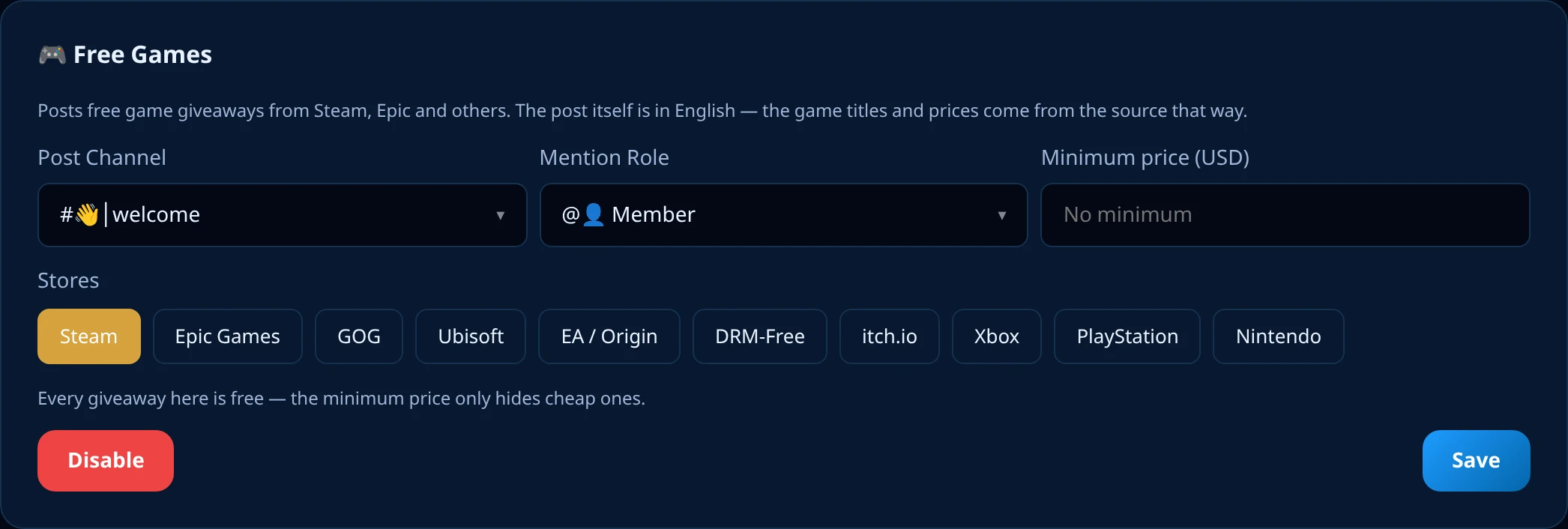
The whole feature lives as a third card on the dashboard's Notifications page, under the YouTube and Twitch cards. Four things to set: the channel, the stores, an optional role to ping, and an optional minimum price. The mention is a role or nothing at all. If the bot later loses access to that channel, or the channel is deleted, the feature pauses itself and the card tells you which of the two happened instead of failing quietly.
What the Minimum Price Really Filters
Every giveaway in this feed is free — the struck-through number is what the game normally costs, not what you pay. So the minimum price is not a budget, it is a noise filter: set it to 10 and giveaways worth less than $10 stop being posted, which removes the steady trickle of $1.99 indie keys without touching the big releases. Leave it empty and everything comes through, and a giveaway whose price the source did not publish is still posted.
Off by Default, and No Flood on the First Day
It is off everywhere until an admin turns it on, and it refuses to enable without a post channel and at least one store. Turning it on marks a starting point — the giveaways already live at that moment are not dumped into your channel, only the ones that appear afterwards. Each game is posted once per server, and pausing and re-enabling later does not reset that starting point.
Why the Post Is in English
The card is in English on purpose, and it is the one place in the bot that does not follow the server's language setting: the game name and the price arrive from the source in English and are not translated, so four Arabic words around an English title would produce a half-Arabic card. The dashboard that configures it is bilingual, Arabic and English with RTL, exactly like every other settings page.
How to set up free game giveaway alerts in Discord with SaqrBot
Open the Notifications page
Open the dashboard's Notifications page and scroll to the Free Games card, under the YouTube and Twitch cards.
Pick the channel
Choose the Discord channel the giveaways should be posted in. The channel has to belong to this server, and the bot needs permission to post there.
Choose your stores
Tap the stores you care about — Steam, Epic Games, GOG, Ubisoft, EA / Origin, itch.io, DRM-Free, Xbox, PlayStation or Nintendo. At least one store is required.
Set a mention role and a minimum price
Optionally pick a role to ping instead of no mention, and set a minimum price in dollars to hide the cheapest giveaways. Both fields can be left empty.
Enable and save
Press Enable, then Save. The feature is off in every server until you do this, and it refuses to turn on without a channel and at least one store.
Explore More
Explore more.
Frequently Asked Questions
What does the Discord free games bot do?
It watches the PC stores for game giveaways and posts each new one into a channel you choose. Every post carries the game name as a link, the normal store price struck through next to the word FREE, the store it comes from, when the offer ends, the game artwork, and a button that opens the giveaway page. You pick which stores you care about, so a Steam-only server never sees console entries.
Which stores does SaqrBot post free games from?
Ten stores are selectable in the dashboard: Steam, Epic Games, GOG, Ubisoft, EA / Origin, itch.io, DRM-Free, Xbox, PlayStation and Nintendo. You tick the ones you want and the rest are never posted. Giveaways that are only for Android or iOS are dropped entirely, because this is a PC and console feature.
Is the free games feature on by default?
No. It is off in every server until an admin turns it on. Nothing was posted anywhere when the feature shipped, and it refuses to enable without a post channel and at least one store — an enabled feature with nowhere to post would look like it works and do nothing.
Why is the free games post in English?
Because the game names and the prices arrive from the source in English and are not translated. Wrapping four Arabic words around an English game title would produce a half-Arabic card, so the whole post stays in one language. The dashboard that configures it is bilingual, Arabic and English, like every other settings page.
What does the minimum price setting do?
Every giveaway in this feed is free — the price shown struck through is what the game normally costs. The minimum price only hides the cheap ones: set it to 10 and giveaways worth less than $10 stop being posted. It never filters out paid games, because there are none, and a giveaway whose price the source did not publish is still posted.
Will the bot flood my channel when I enable it?
No. Turning it on marks a starting point, and only giveaways that appear after that are posted — the dozen offers already live are not dumped into your channel. Each game is posted once per server, and if you pause the feature and turn it back on later the starting point is not reset.
Are there games to play inside Discord?
No. SaqrBot has no games module on Discord — this feature posts free game giveaway offers from the stores, it does not add games to play in chat. Chat games such as trivia are a Twitch feature, not a Discord one.
Is the free games bot free?
Yes. It sits in the same Notifications page as the YouTube and Twitch alerts, with no premium tier and no paid unlock, alongside 15+ other systems in one bilingual web dashboard.
Related
Related reading.