A Discord notification bot watches your YouTube channels and Twitch streamers, then posts an alert into your server the moment one uploads a new video or goes live. With SaqrBot you tell it which YouTube channel and which Twitch streamer to track, pick the Discord channel that should receive the alert, and choose a role to ping. Everything is set from the web dashboard, with no commands to memorize.
What a Discord Notification Bot Does
A Discord notification bot connects an external platform to your server. SaqrBot supports two sources: YouTube and Twitch. For YouTube it watches each tracked channel's upload feed and posts a rich embed — title, link, and thumbnail — when a new video appears. For Twitch it checks each tracked streamer and posts an embed with the stream title, game, viewer count, and link when they go live. It fires only once per new upload or stream.
Set Up a Discord YouTube Notification Bot
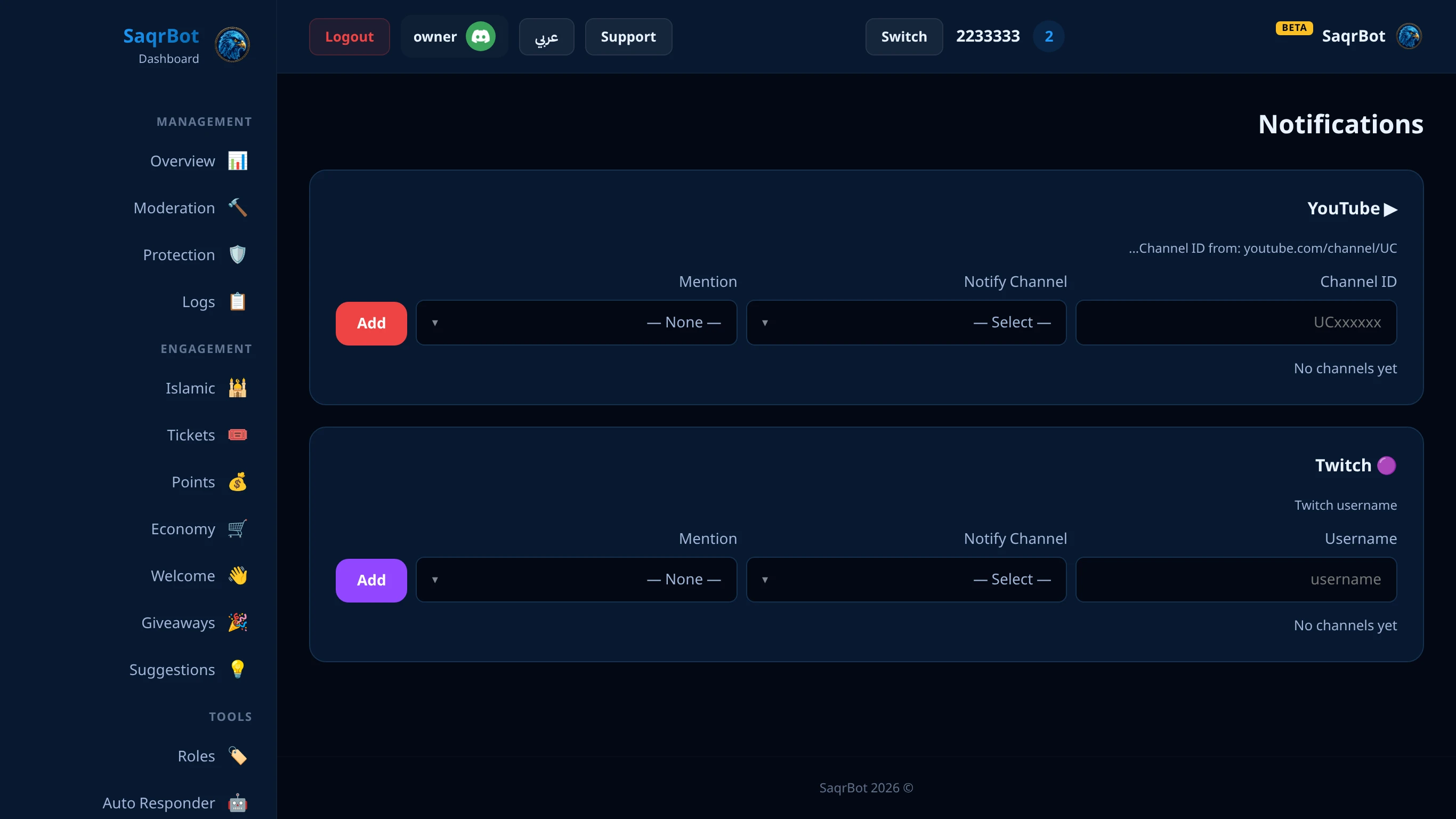
To turn SaqrBot into a Discord YouTube notification bot, open the dashboard's Notifications page and add a YouTube source: enter the channel ID (the UC… value from the channel URL), choose the destination Discord channel, and optionally pick a role to mention — or @everyone / @here. Every new upload then posts an alert embed automatically. You can track multiple channels, each with its own destination and ping — no commands to learn.
Get Twitch Live Alerts in Discord
As a Discord Twitch alert bot, SaqrBot tells your community the moment a streamer goes live. On the same Notifications page, add a Twitch source: type the streamer's username, pick the alert channel, and choose a role to ping. SaqrBot checks Twitch on a short interval and posts a purple go-live embed — title, game, viewer count, and a watch link — once per stream. Track as many streamers as you want, each with its own channel and mention.
Why SaqrBot Is a Great Notification Bot
Most servers run a separate bot just for alerts, then more for moderation and tickets. SaqrBot bundles YouTube and Twitch notifications with 15+ other systems under one bilingual, 33-page dashboard — so alerts, moderation, and everything else share one role and one login. Notifications are managed entirely from the dashboard (no command syntax), every alert can ping a role, and the whole bot is free. It is fully bilingual with RTL support.
How to set up YouTube and Twitch notifications in Discord with SaqrBot
Open the Notifications page
Open the dashboard's Notifications page and add a source — YouTube or Twitch.
Enter the channel or streamer
For YouTube, enter the channel ID (the UC… value from the channel URL). For Twitch, type the streamer's Twitch username.
Choose the alert channel
Pick the Discord channel that should receive the alert.
Pick a role to ping
Optionally choose a role to mention — or @everyone / @here — so the right members are tagged when a new upload or stream goes live.
Explore More
See all 15+ systems SaqrBot offers, browse the full Discord command list, or read our guide to the best Discord moderation bot.
Frequently Asked Questions
What does a Discord notification bot do?
A Discord notification bot connects an external platform to your server so members get told the moment something happens. SaqrBot supports two sources: YouTube and Twitch. It posts a rich embed when a tracked YouTube channel uploads a new video or a tracked Twitch streamer goes live, and it only fires once per new upload or stream — so your members get a clean alert, not spam.
How do I set up YouTube notifications in Discord?
Open the dashboard's Notifications page and add a YouTube source: enter the channel ID (the UC… value from the channel URL), choose the destination Discord channel, and optionally pick a role to mention — or @everyone / @here. Every new upload then posts an alert embed automatically. You can track multiple channels, each with its own destination and ping, with no commands to learn.
How do I get Twitch live alerts in Discord?
On the same Notifications page, add a Twitch source: type the streamer's Twitch username, pick the Discord channel for the alert, and choose a role to ping. SaqrBot checks Twitch on a short interval and posts a purple go-live embed — stream title, game, current viewer count, and a watch link — once per stream. You can track as many streamers as you want, each with its own channel and mention.
Does SaqrBot send Instagram, X/Twitter, or TikTok alerts?
No. SaqrBot tracks only YouTube uploads and Twitch live alerts. It does not track Instagram, X/Twitter, or TikTok.
Can each alert ping a role?
Yes. Every YouTube and Twitch alert can mention a role you choose — or @everyone / @here — so the right members are tagged. You set the ping per source from the dashboard, and you can track multiple sources, each with its own destination channel and mention.
Is SaqrBot's notification bot free?
Yes. SaqrBot bundles YouTube and Twitch notifications with 15+ other systems under one bilingual web dashboard, and the whole bot is free with no premium locks. Notifications are managed entirely from the dashboard — there is no command syntax to memorize — and the alert embeds and dashboard both read in English or Arabic with RTL support.
Related
Related reading.