A Discord welcome bot greets every new member the moment they join. SaqrBot is a free Discord welcome bot that posts a canvas welcome card with the member's avatar, name, and live member count, adds a matching leave card on exit, and auto-assigns a role on join — all set from the dashboard.
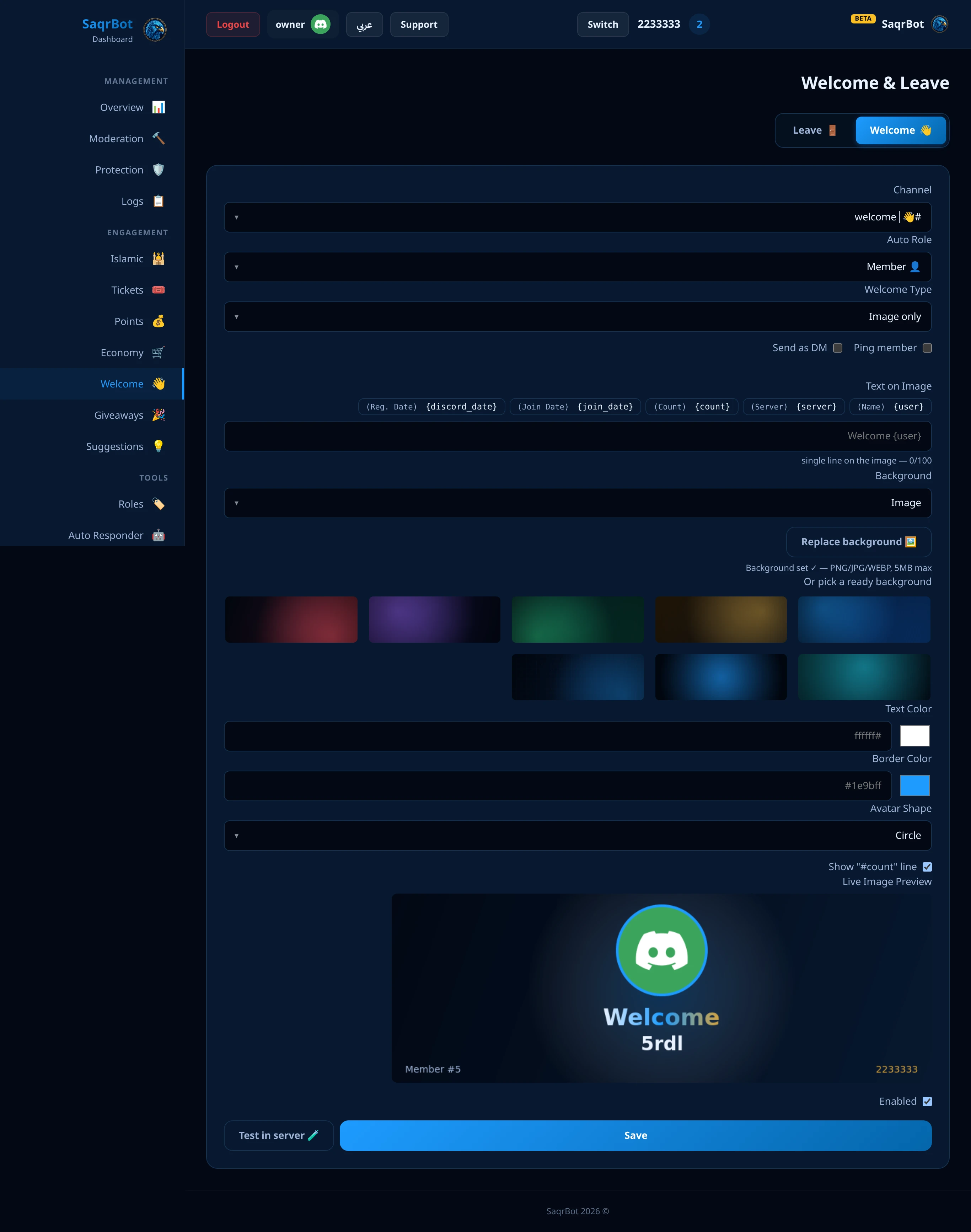
A Discord welcome bot greets new members on join with a canvas welcome card, leave messages, and an auto-role.
Discord welcome images — a card for every new member
رسائل الترحيب النصية يتخطّاها الأعضاء — أما صورة ترحيب ديسكورد فلا. صقر بوت ينشر بطاقة ترحيب كاملة لحظة الدخول: أفتار العضو، سطر ترحيب، رقم العضو المباشر، واسم سيرفرك على خلفية تختارها. أسهل طريقة تسوّي صور ترحيب ديسكورد تناسب سيرفرك، مجاناً.
What a Discord welcome canvas card includes
A welcome canvas is an image SaqrBot auto-generates when someone joins your server. It draws the member's avatar in a circle with a glowing border, a greeting line, the "Member #" count, and the server name. You can upload your own background (a large still photo is shrunk automatically before upload) or pick a ready one, choose the text and border colors, and turn on free layout to move the avatar and text, and the greeting renders in a proper Arabic font (Noto Kufi Arabic) when your server language is Arabic — so right-to-left text looks correct, not broken.
How to set up the Discord welcome bot
Open your Discord welcome bot dashboard, select your server, and go to the Welcome page. Choose a channel, upload a background or pick a ready one, pick a border color, write your greeting text, and enable the system. Your greeting can use variables like {user}, {server}, and {count}, which SaqrBot replaces with the member's name, your server name, and the live member count. That's it — every new member then gets a canvas welcome card automatically.
Leave messages too
The welcome module also posts leave (goodbye) cards when members leave.
Auto Role
Auto-assign a role to every new member.
Boost Thank-You Messages
The same Welcome page has a Boost tab. Pick a channel and SaqrBot thanks every member who boosts your server, as plain text or an embed, with variables like {user} and {boost_count}. Use the test button to see the message in your server first. For reliable detection of every boost, keep boost messages on in your server's system channel settings.
How to set up a Discord welcome bot
Open the Welcome page
Open your Discord welcome bot dashboard, select your server, and go to the Welcome page.
Choose a channel and design
Choose a channel, upload a background or pick a ready one, and pick a border color for the canvas welcome card.
Write your greeting
Write your greeting text using variables like {user}, {server}, and {count}, which SaqrBot replaces with the member's name, your server name, and the live member count.
Enable the system
Enable the system. Every new member then gets a canvas welcome card automatically, plus a leave card on exit and an auto-role on join.
Frequently Asked Questions
What is a Discord welcome bot?
A Discord welcome bot greets new members the moment they join. SaqrBot is a free Discord welcome bot that does it with a canvas-generated welcome card showing the member's avatar, name, and live member count, plus matching leave messages and an auto-role that's assigned on join.
What does the welcome canvas card include?
The canvas card is an image SaqrBot auto-generates when someone joins. It draws the member's avatar in a circle with a glowing border, a greeting line, the Member # count, and the server name. You can upload your own background (a large still photo is shrunk automatically before upload) or pick a ready one, choose the text and border colors, and turn on free layout to move the avatar and text, and the greeting renders in a proper Arabic font (Noto Kufi Arabic) when your server language is Arabic.
How do I set up the Discord welcome bot?
Open your Discord welcome bot dashboard, select your server, and go to the Welcome page. Choose a channel, upload a background or pick a ready one, pick a border color, write your greeting text, and enable the system. Your greeting can use variables like {user}, {server}, and {count}, which SaqrBot replaces with the member's name, your server name, and the live member count.
Does the welcome bot send leave messages too?
Yes. The same module also handles goodbye messages. When a member leaves, SaqrBot can post a leave card so your logs and your community always reflect who's coming and going — useful for keeping a pulse on activity.
Can the welcome bot assign an auto-role on join?
Yes. While setting up welcome messages, you can also assign an auto-role. Every new member automatically receives a role when they join — perfect for giving everyone a default Member role or a color role. Configure it from the same Welcome page in the dashboard.
Does the welcome bot support Arabic?
Yes. SaqrBot renders the welcome greeting in a proper Arabic font (Noto Kufi Arabic) so right-to-left text looks correct, not broken, and the entire dashboard is bilingual (English and Arabic with RTL) — a strong fit for Saudi and Gulf servers.
Related
Related: Discord auto roles, ticket bot, protection guide, features, commands. Or start from the Discord bot overview.