A Twitch moderation bot watches your chat and acts on rule-breaking messages the instant they land — deleting them, warning the sender, or timing them out. SaqrBot auto-mods chat in real time across three layers — a central severe-word filter, link protection, and your own channel banned words — sarcasm-aware, bilingual, and configured from one dashboard. Mods and the broadcaster are always exempt.
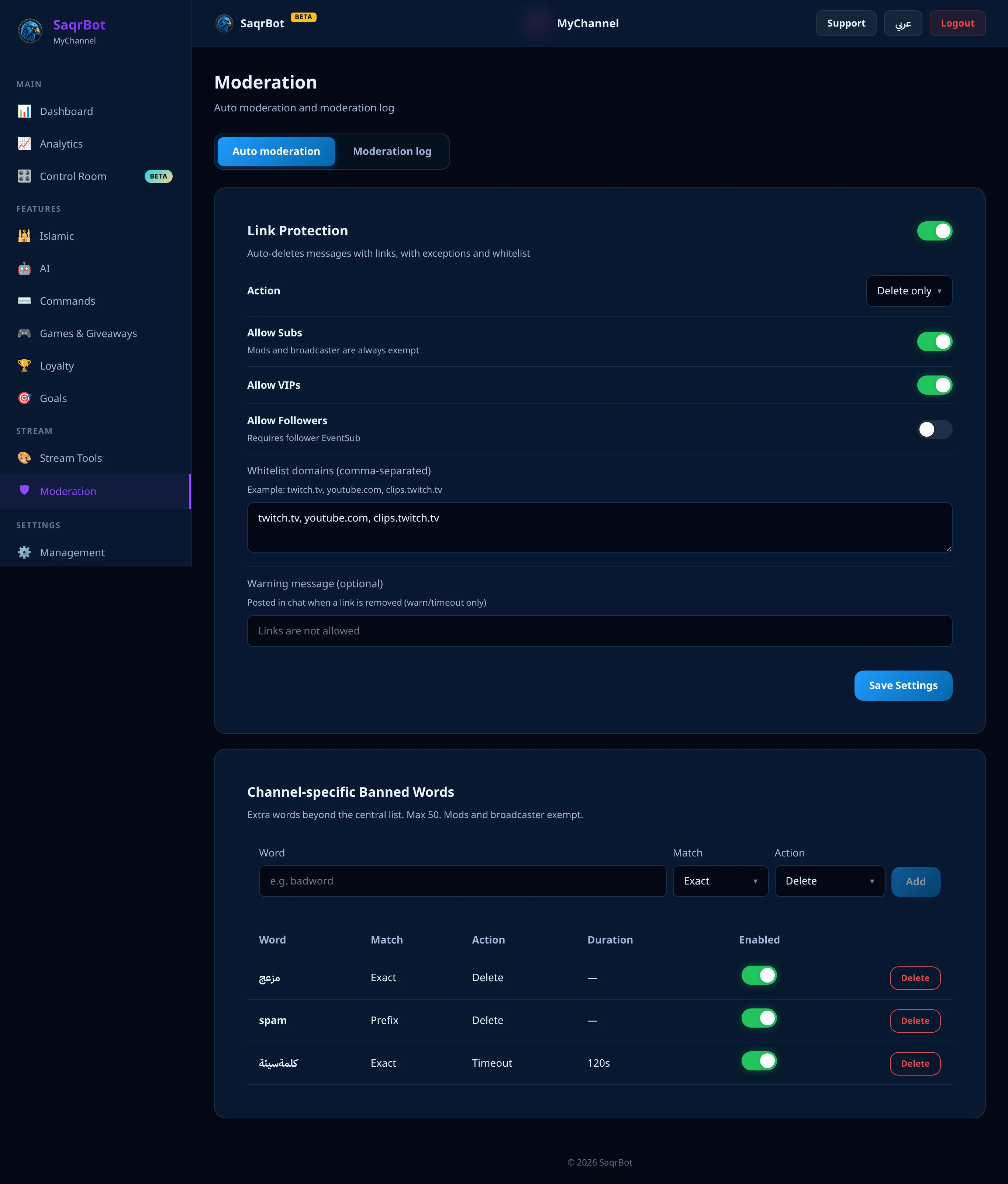
What a Twitch Moderation Bot Does
A Twitch moderation bot reads your chat for you and enforces your rules automatically, the moment a message breaks them. SaqrBot inspects every incoming message and decides on the spot whether to delete it, warn, or time out the sender. It runs server-side, so it keeps moderating whether you are mid-game, AFK, or streaming solo — and mods and the broadcaster are always exempt.
Severe-Word Filtering, Sarcasm-Aware
At the core is a central severe-word filter that scans every message against a curated Arabic and English list with severity levels. SaqrBot deletes a matching message on the spot, and for higher-severity hits it adds a 60-second timeout. It is sarcasm-aware: after a punishment it can post a short one-line sarcastic reply in your bot's voice and language, never repeating the offending word. Normalization-aware matching means stretched letters and Arabic letter variants do not slip profanity past it.
Link Protection With Exemptions
Streamers see a steady drip of link spam — promo bait, free-skin scams, crypto drops. SaqrBot's link protection auto-detects URLs and bare domains, then acts on your terms: delete only, delete plus a warning, or delete plus a timeout with a duration you set. Toggle exemptions for subs, VIPs, or followers, keep a comma-separated whitelist of trusted domains like twitch.tv or youtube.com, and mods and the broadcaster can always post links.
Your Own Channel Banned Words
Every community has its own no-go words. On top of the central list, SaqrBot lets you add up to 50 channel-specific banned words from the dashboard. For each word you pick exact or prefix matching, set the action to delete or timeout, and choose a timeout duration. Like the rest of auto mod, mods and the broadcaster are exempt, so your team never trips your own filters.
How to Set It Up From the Dashboard
Setup takes a few minutes and no code. Connect your channel, open the dashboard, and go to the Moderation page's Auto moderation tab. Turn on Link Protection and pick its action; add exemptions and your whitelist. Then add channel banned words with exact or prefix matching and a delete or timeout action. Save, and the central severe-word filter keeps running on top automatically.
- Connect your Twitch channelConnect your Twitch channel to SaqrBot, then open the dashboard and go to the Moderation page and its Auto moderation tab.
- Turn on link protectionEnable Link Protection, pick the action — delete only, delete plus a warning message, or delete plus a timeout — and set the timeout duration if you chose timeout.
- Set exemptions and a whitelistAllow subs, VIPs, or followers to post links if you want, and add trusted domains like twitch.tv or youtube.com to the comma-separated whitelist. Mods and the broadcaster are always exempt.
- Add channel banned wordsIn the Channel-specific Banned Words card, add a word, choose exact or prefix match, choose delete or timeout as the action, set a duration for timeouts, then add it. You can add up to 50 words.
- Save and let the severe-word filter runSave your settings. The central severe-word filter runs automatically on top of your rules, deleting explicit profanity and timing out repeat-level offenders, with an optional sarcastic reply in your bot's voice.
Explore More
Moderation is one part of what SaqrBot does on Twitch. See the full Twitch bot feature set — AI chat, alerts, goals, and games — read how it works as a Twitch chat bot, or compare moderation in our best Discord moderation bot guide. On Twitch the command prefix is !.
Frequently Asked Questions
What is a Twitch moderation bot?
A Twitch moderation bot watches your chat and acts on rule-breaking messages automatically — deleting them, warning the sender, or timing them out — so you do not have to read every line yourself. SaqrBot moderates in real time with three layers: a central severe-word filter that catches explicit profanity, link protection that removes unwanted URLs, and your own channel-specific banned words. Mods and the broadcaster are always exempt, and everything is configured from a bilingual dashboard.
How does SaqrBot's severe-word filter work?
SaqrBot scans every chat message against a curated Arabic and English severe-word list with severity levels. When a message matches, SaqrBot deletes it, and for higher-severity hits it also applies a 60-second timeout. It is sarcasm-aware too: after a punishment it can post a short, one-line sarcastic reply in your bot's personality, without repeating the offending word. The filter is normalization-aware so spacing and letter tricks do not slip profanity past it.
Can SaqrBot block links in Twitch chat?
Yes. Link protection auto-detects URLs and bare domains in chat and removes them. You choose the action — delete only, delete plus a warning message, or delete plus a timeout with a duration you set. You can exempt subscribers, VIPs, or followers, keep a whitelist of trusted domains like twitch.tv or youtube.com, and mods and the broadcaster are always allowed to post links.
Can I add my own banned words?
Yes. On top of the central severe-word list, you can add up to 50 channel-specific banned words from the dashboard. For each word you choose exact or prefix matching, set the action to delete or timeout, and set a timeout duration. Mods and the broadcaster are exempt, so your trusted team is never caught by your own filters.
Does SaqrBot's auto mod understand Arabic?
Yes. SaqrBot was built bilingual, so its severe-word filter normalizes Arabic text — unifying alif forms, ta-marbuta, and stretched or repeated letters — and matches both Arabic and English profanity. The sarcastic auto-reply also speaks your channel's language, Arabic or English, so moderation feels native to a Gulf or Saudi chat rather than bolted on.
How do I set up Twitch moderation with SaqrBot?
Connect your Twitch channel, open the dashboard, and go to the Moderation page's Auto moderation tab. Turn on link protection and pick its action, set exemptions and a domain whitelist, then add any channel-specific banned words with exact or prefix matching. Save, and the central severe-word filter runs automatically on top. No code and no separate moderation service needed.
Related
Related reading.
Ready to auto-mod your Twitch chat?
Free forever. Severe-word filtering, link protection, and channel banned words — all bilingual, all from the dashboard.
Connect Twitch