A Twitch stats bot watches your channel and turns raw chat activity into numbers you can act on. SaqrBot's Twitch stats bot tracks total chat messages, active chatters, follows, watch time, and per-viewer XP — on a KPI dashboard with a silent stats-only mode that never posts in chat.
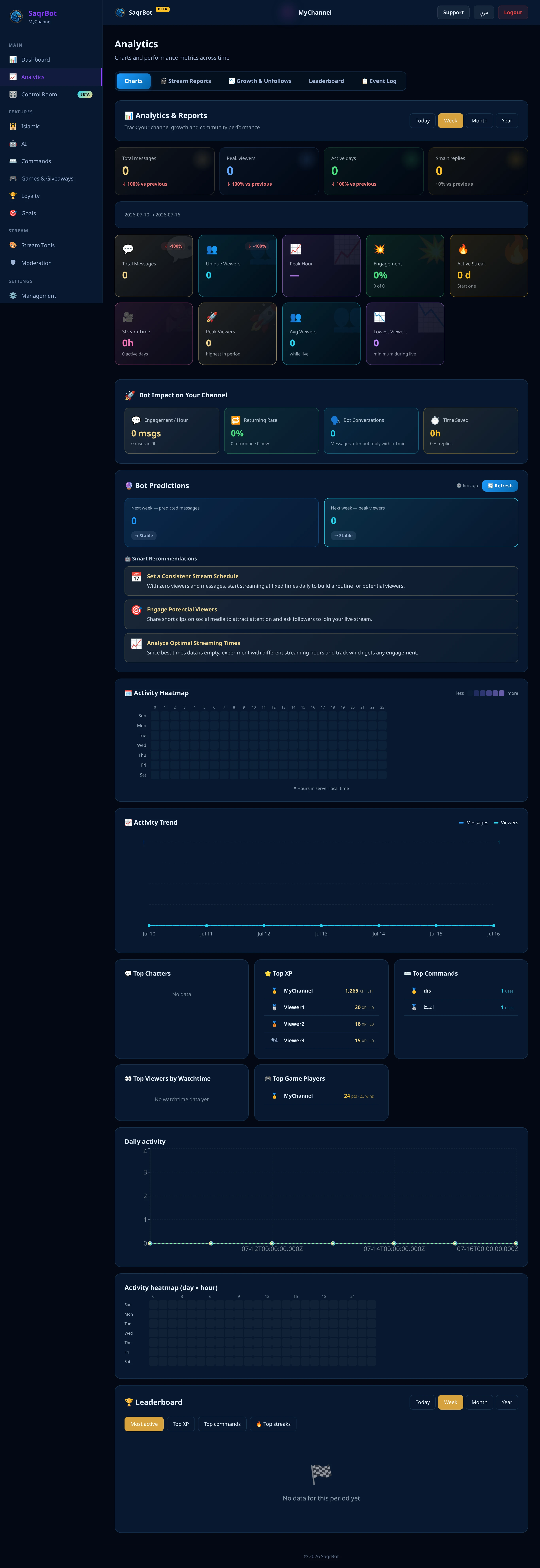
What a Twitch Stats Bot Tracks
A Twitch stats bot's core is stream metrics. SaqrBot logs every chat message, counts unique viewers and active chatters, tracks follows, watch time, and per-viewer XP and leveling — plus peak hour, active streak, and leaderboards for top chatters, XP, and watch time.
The KPI Dashboard and Per-Viewer Profiles
SaqrBot's Twitch analytics live on a KPI dashboard of tiles — messages, viewers, peak hour, engagement, streak, stream time, peak and average viewers — each with a change pill vs. the previous period. Switch between today/week/month/year and open per-viewer profiles. The whole dashboard is bilingual with full RTL.
Silent Stats-Only Mode
SaqrBot's silent stats-only mode keeps the bot completely quiet — it sends no messages at all, while stats collection keeps running: XP, watch time, chat logs and follower/sub events all keep flowing into your dashboard. Flip it on and SaqrBot becomes a pure analytics layer, invisible to viewers.
Why SaqrBot for Twitch Stats
SaqrBot pairs a real Twitch stats bot with an AI chat assistant, XP, commands, auto-moderation and goals — all bilingual and free. Browse the Twitch stats bot overview, the command list, or our Twitch chat bot guide. (Twitch commands use the ! prefix.)
Frequently Asked Questions
What does a Twitch stats bot track?
SaqrBot logs every chat message and counts your unique viewers and active chatters, so you see real engagement. It tracks follows and follower-goal progress, stream watch time, and per-viewer XP and leveling. On top of the totals it surfaces your peak hour, your active-day streak, peak and average viewers, and leaderboards for your top chatters, top XP, and top watch time.
Does SaqrBot have a stats dashboard?
Yes. SaqrBot's Twitch analytics live on a KPI dashboard of tiles — total messages, unique viewers, peak hour, engagement rate, active streak, stream time, peak and average viewers — each with a change pill comparing this period to the last. Switch between today, week, month and year views, and dig into per-viewer profiles. The whole dashboard is bilingual with full right-to-left layout.
What is silent stats-only mode?
Silent stats-only mode keeps the bot completely quiet: it sends no messages at all, while stats collection keeps running in the background. XP, watch time, chat logs and follower/sub events all keep flowing into your dashboard, so you get the full Twitch stats bot experience without a single line in chat. Flip it on from the dashboard and SaqrBot becomes a pure analytics layer — invisible to viewers, fully informative to you.
Is the SaqrBot Twitch stats bot free?
Yes. Stats aren't a paywalled add-on — the KPI dashboard, per-viewer leaderboards, and the silent stats-only mode ship with the bot, all bilingual and all free. Connect your channel and the stats start the moment you connect.
Does the Twitch stats dashboard work in Arabic?
Yes. The whole dashboard is bilingual, flipping between English and Arabic with full right-to-left layout from a single toggle — so Saudi and Gulf streamers can read their KPI tiles, leaderboards, and per-viewer profiles clearly in Arabic.
Related
Related reading.
Ready to track your channel?
Free forever. No premium locks. Stats start the moment you connect.
Connect Twitch