A Discord embed bot turns plain messages into rich embeds — clean, boxed cards with a title, a description, a colored side-bar, a footer, and a thumbnail or full-width image. With SaqrBot the whole thing is one slash command: /embed builds the rich embed from your inputs and sends it to any channel you pick. This guide shows what a Discord embed bot does, how to make rich embeds, and how to save them as reusable templates.
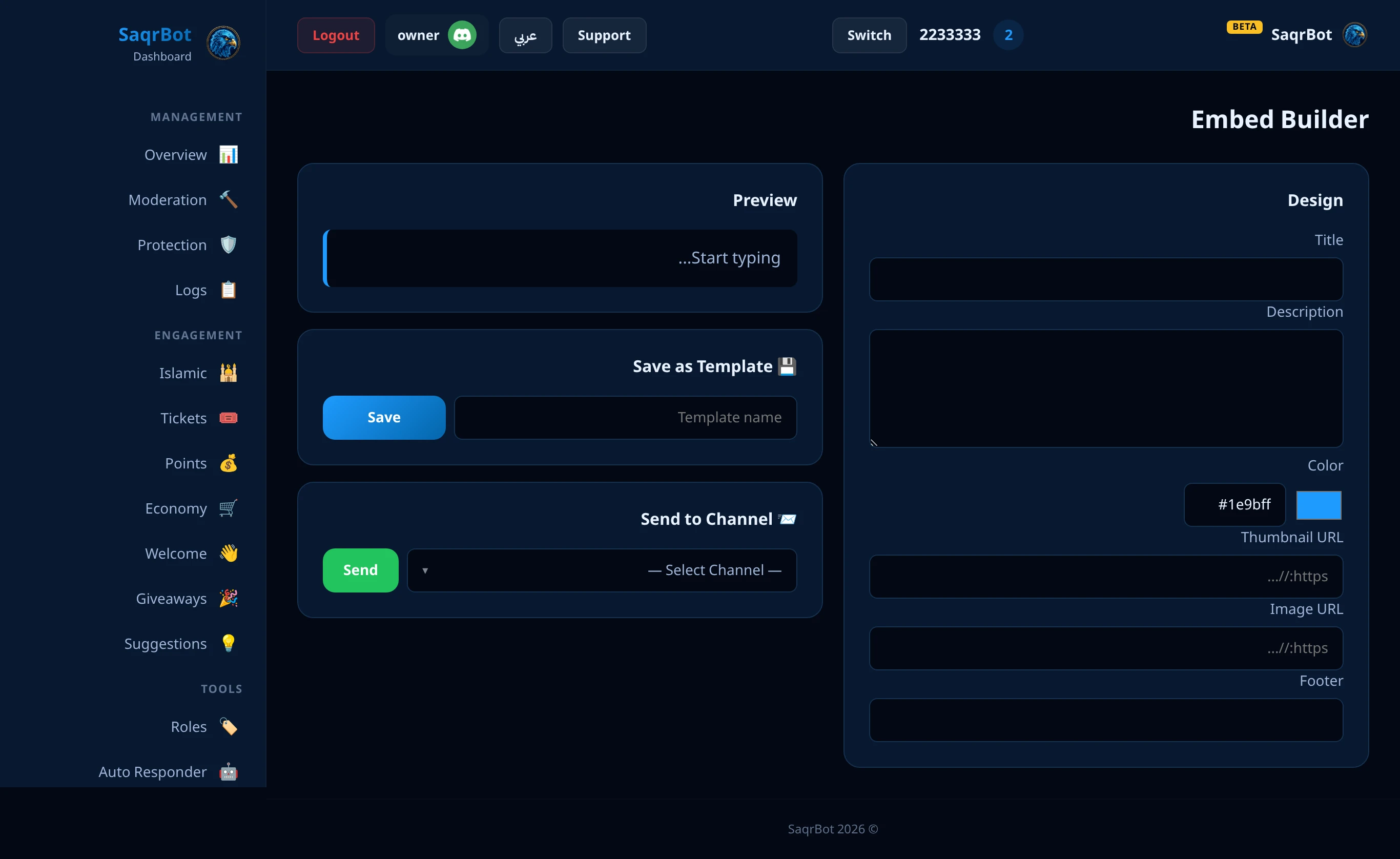
What a Discord Embed Bot Does
A Discord embed bot unlocks the rich embed format Discord reserves for apps: a card with a bold title, a formatted description, a colored accent bar, a thumbnail, a large image, and a footer line. The bot collects each part as an input and assembles the embed for you — no raw JSON, no third-party builder site.
How to Make a Rich Embed with /embed
Run /embed send and fill in the parts: a channel, a title, and a description are required, and you can add a color (a hex like #1e9bff), a thumbnail URL, a full image URL, and a footer line. SaqrBot assembles those into one embed and posts it to the channel you chose — the slash-command options are the builder. Leave the color out and it falls back to a clean blue.
Save and Reuse Embed Templates
Run /embed save with a name plus the title, description, color, and image to store a template. Later, /embed use posts that saved template to any channel by name, and /embed templates lists everything you have stored — turning a recurring post into a two-second command with consistent formatting.
One Bot for Embeds and Everything Else
SaqrBot bundles the embed builder with 15+ systems (moderation, protection, tickets, economy, leveling, giveaways, welcome, and more) under one bilingual, 33-page web dashboard. The /embed command is admin-only by default, so only your staff can post official-looking embeds.
Explore More
See all 15+ systems in the SaqrBot embed bot, browse the command list including /embed, or read our welcome bot guide.
Frequently Asked Questions
What is a Discord embed bot?
بوت امبد ديسكورد يحوّل الرسائل العادية إلى إمبد احترافي — كرت فيه عنوان ووصف وشريط لون وفوتر وصورة، فتبيّن منشوراتك مصمّمة مو جدار نصوص.
How do I make a rich embed with SaqrBot?
شغّل /embed send واملأ القناة والعنوان والوصف (مطلوبة)، وتقدر تضيف لون وصورة وفوتر — وصقر بوت يركّبها وينشرها بدون موقع خارجي.
Can I save and reuse embed templates?
إيه، /embed save يخزّنه كقالب، و/embed use ينشره بالاسم، و/embed templates يعرض كل قوالبك — منشور متكرر بثانيتين.
Do I need an external embed builder website?
لا، كله بأمر واحد /embed — يبني الإمبد من مدخلاتك ويرسله بدون ماركداون ولا JSON ولا موقع خارجي.
Who can use the /embed command?
أمر /embed للأدمن افتراضياً، فبس فريقك ينشر إمبد رسمي — وتقدر كمان تضبطه من اللوحة.
Is the Discord embed bot free?
إيه، ببلاش للأبد بدون قيود، ومجموع مع 15+ نظام تحت لوحة وحدة ثنائية اللغة بـ 33 صفحة.
Related
Related reading.