A Discord server backup bot saves a snapshot of your server's structure — every role and channel, their order, categories, permission overwrites, topics, and slowmode — so that if a raid, a rogue admin, or a simple mistake wipes things, you can rebuild the whole layout in minutes. SaqrBot snapshots your roles and channels, stores them encrypted, and restores the structure on command.
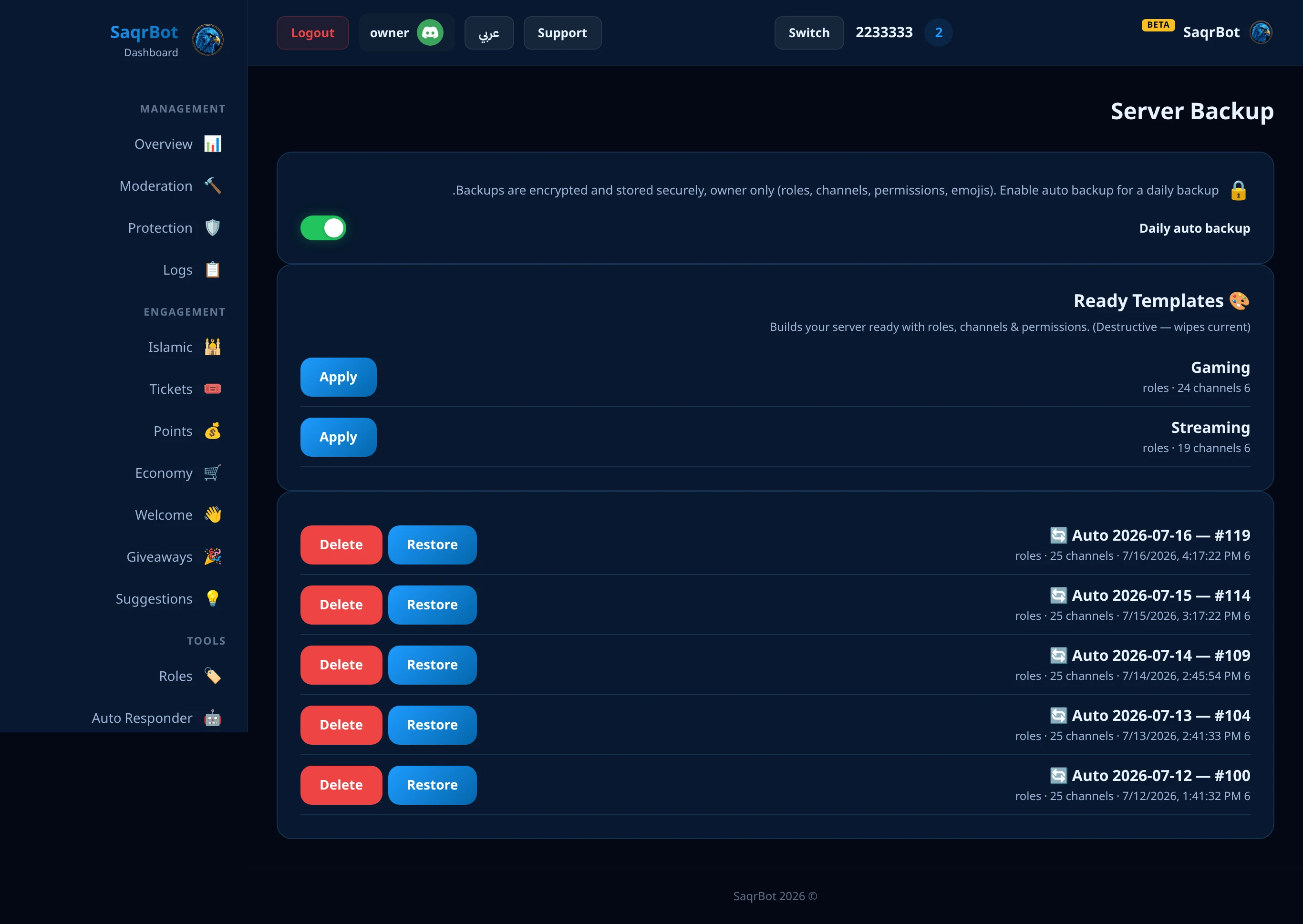
What a Discord Server Backup Bot Saves
SaqrBot's snapshot saves your full structure: every role (name, color, hoist, mentionable, permissions, order) and every channel — text, voice, category, announcement, stage, forum — with each channel's category, position, topic, NSFW flag, slowmode, and voice bitrate/user-limit. It also saves permission overwrites, server settings (verification level, notifications, content filter), and custom emojis and stickers. Snapshots are encrypted and your server keeps the 5 most recent. It saves structure, not content — no messages, history, or members, because Discord won't let a bot recreate those.
Restore From a Backup After a Raid or Mistake
When a server is nuked or someone deletes the wrong category, restore rebuilds the layout from a saved snapshot. SaqrBot recreates your roles first (colors, permissions, order), then categories and channels in their original positions — with topics, slowmode, NSFW flags, voice bitrate and user limits, and every overwrite re-wired to the rebuilt roles. Restore is destructive: it wipes current channels and roles and rebuilds to match the snapshot, so it runs only for the server owner and only after explicit confirmation.
The /backup Command (and Auto-Backup)
Everything runs from one owner-only command: /backup. Use /backup list to see your snapshots (ID, roles/channels count, age), /backup delete id:<number> to remove one, and /backup restore id:<number> confirm:True to rebuild — the confirm flag is required because restore wipes and rebuilds. You don't snapshot by hand: turn on auto-backup from the dashboard and SaqrBot captures a fresh snapshot every 24 hours, keeping the 5 most recent and rotating out the oldest automatically.
Why Pair Backup With Server Protection
A backup is your safety net, but the best outcome is never needing it. That's why SaqrBot bundles its server backup bot with multi-layer protection — anti-nuke, anti-raid, anti-spam, link guard, anti-bot-add — that acts before damage spreads, plus full moderation and logging under one bilingual dashboard. Protection stops most attacks at the door; backup is there for the rare time something gets through.
How to back up and restore a Discord server with SaqrBot
Turn on auto-backup
Turn on auto-backup from the dashboard so SaqrBot captures a fresh snapshot every 24 hours, keeping the 5 most recent and rotating out the oldest automatically.
List your snapshots
Run /backup list to see your saved snapshots, each with its ID, roles and channels count, and how long ago it was taken.
Restore from a snapshot
Run /backup restore id:<number> confirm:True to rebuild the server from that snapshot. The confirm flag is required because restore wipes the current channels and roles and rebuilds them to match the snapshot, and it runs only for the server owner.
Explore More
See all 15+ systems, browse the full command list, or read our Discord server protection guide.
Frequently Asked Questions
What does a Discord server backup bot save?
SaqrBot's snapshot saves your server's full structure: every role (name, color, hoist, mentionable, permissions, and order) and every channel — text, voice, category, announcement, stage, and forum — with each channel's category, position, topic, NSFW flag, slowmode, and voice bitrate and user limit. It also saves your per-channel permission overwrites, server settings (verification level, default notifications, and explicit-content filter), and custom emojis and stickers.
Does the backup bot save messages and members?
No. A Discord server backup bot saves structure, not content — it does not back up messages, message history, or members, because Discord does not allow a bot to recreate those. SaqrBot snapshots roles, channels, permissions, server settings, emojis, and stickers.
How do I restore my server after a raid or mistake?
Restore rebuilds the layout from a saved snapshot: SaqrBot recreates your roles first (with their colors, permissions, and order), then your categories and channels in their original positions — with topics, slowmode, NSFW flags, voice bitrate and user limits, and every permission overwrite re-wired to the rebuilt roles. Restore is destructive by design, so it runs only for the server owner and only after an explicit confirmation.
What is the /backup command?
Everything runs from one owner-only command: /backup. Use /backup list to see your saved snapshots, /backup delete id:<number> to remove one, and /backup restore id:<number> confirm:True to rebuild the server from that snapshot. The confirm flag is required because restore wipes and rebuilds.
Does SaqrBot back up automatically?
Yes. You don't take snapshots by hand: turn on auto-backup from the dashboard and SaqrBot captures a fresh snapshot every 24 hours, keeping the 5 most recent and rotating out the oldest automatically. That means there's always a recent restore point waiting when you need it.
Are the backups encrypted?
Yes. Snapshots are encrypted before they're stored, and your server keeps the 5 most recent. Pairing backup with SaqrBot's multi-layer protection — anti-nuke, anti-raid, anti-spam, link guard, and anti-bot-add — means a wiped server is a 10-minute recovery, not a weekend of rebuilding.
Related
Related reading.