Discord server protection means a bot that automatically blocks spam, raids, nukes, malicious links, and unauthorized bot adds in real time. The most reliable approach uses five layers, each catching what the previous one misses.
Layer 1: Anti-Spam
SaqrBot's Anti-Spam flags more than 5 messages in 5 seconds, then auto-mutes the offender after 3 warnings. Thresholds are adjustable from the dashboard.
Layer 2: Anti-Raid
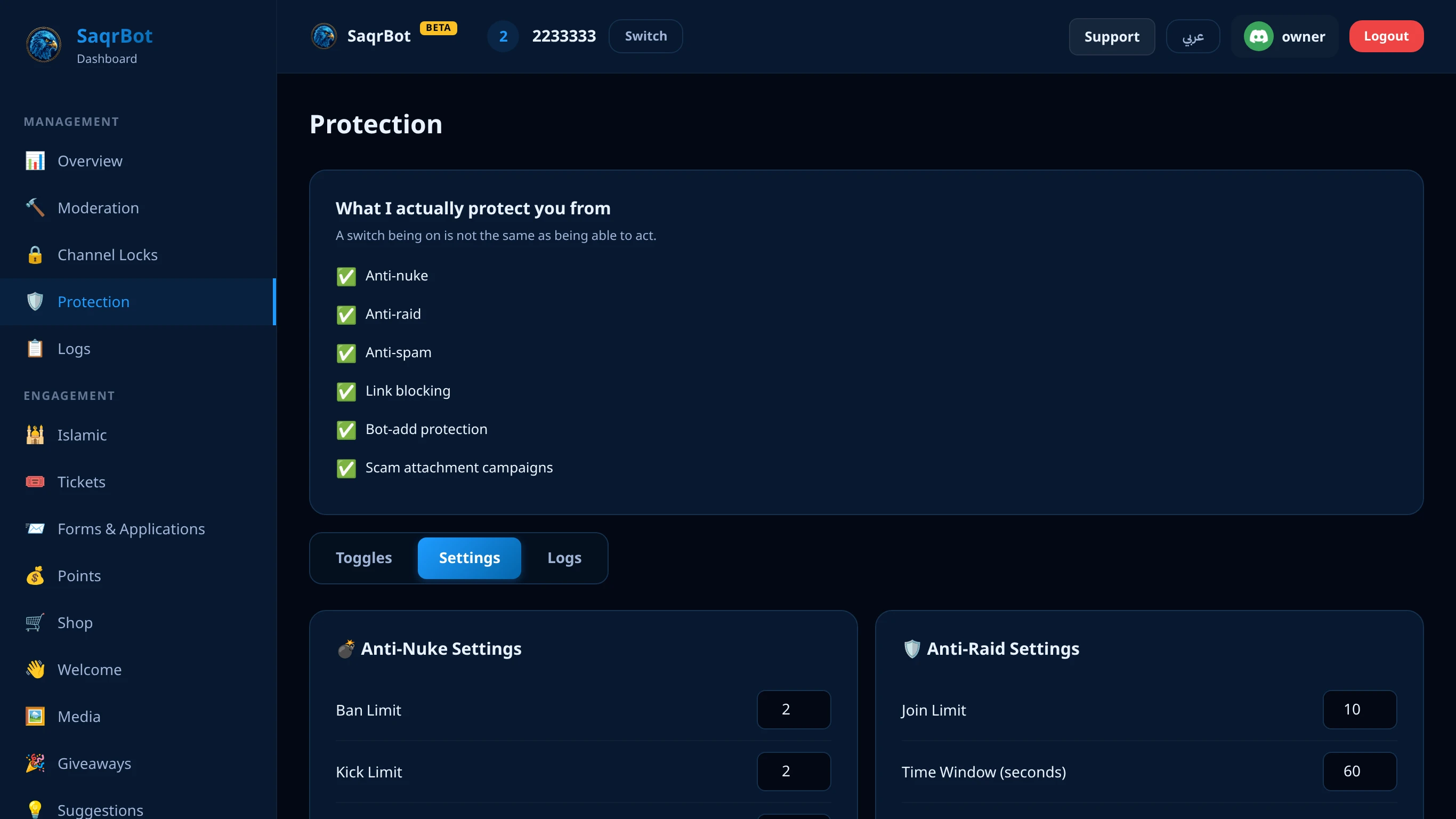
Anti-Raid detects mass-join waves — by default more than 10 joins within 60 seconds — and automatically pauses new invites for 10 minutes to stop the wave, then restores them on its own.
Layer 3: Anti-Nuke — stop server destruction
Anti-Nuke watches the audit log and stops destructive actions — by default more than 2 bans, kicks, channel/role deletes, or webhook creations within 10 seconds — even from an admin. Trusted accounts can be whitelisted.
Layer 4: Link Guard
Phishing links, IP grabbers, fake-nitro scams, and invite-spam are how most account hijacks start. Link Guard deletes links to known phishing hosts on its own. On top of that you choose the model: whitelist the domains your community actually uses so any other link is auto-deleted the moment it's posted, or keep a blocklist of domains you never want to see. You can exclude trusted roles (like staff) so moderators can still share links freely, while everyone else stays inside the safe set of domains.
Layer 5: Anti-Bot-Add
Anti-Bot-Add blocks unauthorized bot additions — it watches the audit log for new bot joins and removes any bot you didn't approve, closing the most common path to a nuke.
Beyond the five layers: scam screenshots from hacked accounts
A newer attack does not need a link at all. An attacker takes over a real member's account and, within seconds, posts the same scam screenshot — a fake crypto casino or a fake “you won” prize — into channel after channel. When the lure sits inside an image instead of a clickable link, Link Guard has nothing to match, and because the posts come from a familiar member, people trust them before a moderator can react.
SaqrBot's Scam Attachment Campaigns guard watches for exactly that pattern: one account posting the same attachment into 3 or more channels within 10 seconds, where a thread counts as its parent channel. It recognises “the same attachment” by a fingerprint of the file's name, size, type and dimensions — it does not open the image or read what it shows.
Once the pattern fires, SaqrBot deletes every copy it tracked, then keeps deleting identical follow-up posts from that account for 5 minutes, up to 50 deletions per incident. It never mutes, kicks or bans the member — the account is most likely hacked, and its owner is a victim too. Your mod-log gets one incident note that updates as follow-ups are removed; the note needs a mod-log channel, which you choose in the dashboard's logging settings (see the Discord logging bot guide). Webhook posts are exempt.
Staff accounts get an alert instead of a deletion. If the poster is the server owner, has Administrator or Manage Server, holds one of your exempt roles, or SaqrBot cannot determine their permissions, nothing is deleted; your mod-log receives one “possibly compromised account” alert per account every 24 hours, so a human makes the call. The guard is on by default — find the “Scam Attachment Campaigns” card on the dashboard Protection page, with three options: Default (on), On and Off.
Why we built it: in the 30 days before launch, 189 of 196 detections from ordinary members in servers running SaqrBot were two campaigns spraying the same four fake “MrBeast crypto casino” screenshots.
A sixth layer: an Arabic-aware word filter
The five layers above stop coordinated attacks. A separate, optional Discord Arabic word filter handles a different problem: one member typing a banned word with an extra letter, spaces between the letters, or a common Arabic prefix or suffix stuck to it. It normalizes Arabic before comparing, so those tricks don't get past it the way they get past a filter built for English. Free, off by default, and configured from the same Protection page.
Slow down brand-new accounts before they can act
A raid or a scam wave is often made of accounts created minutes earlier. SaqrBot's verification gate is an optional, off-by-default extra step: set an account-age threshold from 1 to 60 days (7 by default), and any member whose Discord account is younger than that sees only a single verification channel and a one-button panel — press it, and the gate role is removed. You can also switch the gate to cover every new member, whatever the account age. Your normal welcome auto-role, if you use one, waits until that member verifies instead of granting itself on join.
If SaqrBot is offline when a new-enough account joins, the gate fails open — the member joins normally rather than getting stuck behind a bot that isn't there to press the button for. Setup reports back every channel it changed or had to skip, so you know exactly what the gate can and can't see. Every pass, gate and verification event is on the dashboard's Protection Logs tab with the member's name and the reason, alongside your other Protection events.
One Logs Tab, Every Action, With Names Instead of Raw IDs
Every automatic action across all six layers lands on the Protection page's Logs tab with a reason and every involved member, channel or role resolved to its real name — never a bare id next to a name.
How SaqrBot Delivers Discord Server Protection
SaqrBot is a Discord protection bot with all five layers built in, each enabled by a dashboard toggle. It pairs with Discord moderation tools and an audit log. Browse the Discord features or commands.
How to set up 5-layer Discord server protection with SaqrBot
Enable Anti-Spam
Toggle on Anti-Spam from the dashboard. It tracks how fast each member posts — by default it flags more than 5 messages within 5 seconds and auto-mutes the offender for 5 minutes after 3 warnings.
Enable Anti-Raid
Toggle on Anti-Raid. It counts joins in a rolling window — by default it triggers when more than 10 members join within 60 seconds — and automatically pauses new invites for 10 minutes to stop the wave, then restores them on its own.
Enable Anti-Nuke
Toggle on Anti-Nuke. It watches the audit log and stops anyone who crosses the limits — by default more than 2 bans, kicks, channel deletes, role deletes, or webhook creations inside a 10-second window — even if they hold admin. Trusted accounts can be whitelisted.
Enable Link Guard
Toggle on Link Guard. Whitelist the domains your community actually uses, and any other link is auto-deleted the moment it's posted. Trusted roles can be excluded so staff share links freely.
Enable Anti-Bot-Add
Toggle on Anti-Bot-Add. It watches the audit log for new bot joins and removes any bot you didn't approve, closing the most common path to a nuke.
Related Reading
Go deeper on the best Discord moderation bot features, set up a Discord ticket system, or compare with MEE6 and ProBot. Once your server is safe, greet new members with a Discord welcome bot. And keep a full audit trail with the Discord logging bot guide.
Frequently Asked Questions
What is Discord server protection?
Discord server protection means putting a bot in place that automatically blocks the attacks a community can't watch for 24/7 — spam floods, mass-join raids, admin nukes, malicious links, and unauthorized bot adds. A protection bot watches every message, join, and audit-log action in real time and acts in milliseconds, faster than any human moderator.
What are the 5 layers of protection?
The five layers are Anti-Spam, Anti-Raid, Anti-Nuke, Link Guard, and Anti-Bot-Add. Each defends against a different threat, so a threat that slips past one layer is caught by the next. All five are built into SaqrBot and toggled on from one dashboard.
How does Anti-Nuke stop a rogue admin?
Anti-Nuke watches the audit log for destructive actions and stops anyone who crosses the limits — by default more than 2 bans, kicks, channel deletes, role deletes, or webhook creations inside a 10-second window — even if they hold admin. Trusted accounts can be whitelisted so legitimate cleanup isn't blocked.
How do I protect my server from a Discord nuke bot?
A Discord nuke bot mass-deletes channels and roles and mass-bans members in seconds. Two layers stop it: Anti-Bot-Add removes unauthorized bots instantly, and Anti-Nuke halts mass-destructive actions even from an admin. SaqrBot enables both from one dashboard, free.
How does Anti-Raid detect a raid?
Anti-Raid counts joins in a rolling window — by default it triggers when more than 10 members join within 60 seconds — and automatically pauses new invites for 10 minutes to stop the wave, then restores them on its own, instead of relying on a moderator to notice in time.
Does Link Guard block every link?
Link Guard deletes links to known phishing hosts on its own. On top of that you choose the model: whitelist the domains your community actually uses so any other link is auto-deleted the moment it's posted, or keep a blocklist of domains you never want to see. You can exclude trusted roles like staff so moderators can still share links freely, while everyone else stays inside the safe set of domains.
What if a hacked account posts scam screenshots in every channel?
SaqrBot's Scam Attachment Campaigns guard, on by default, catches one account posting the same attachment into 3 or more channels within 10 seconds. It deletes every copy plus identical follow-ups for 5 minutes (up to 50) and never mutes, kicks or bans the member. For staff accounts it sends one “possibly compromised account” alert per 24 hours to your mod-log instead of deleting.
Does the protection system log what it does, and why?
Yes. Every automatic action — word-filter deletions, blocked links, spam warnings, timeouts, kicks and bans — appears on the Protection page's Logs tab with its reason and the member, channel or role involved shown by name, not a raw Discord id.
Is SaqrBot's protection bot free?
Yes. SaqrBot is a free Discord protection bot with all five layers built in — Anti-Spam, Anti-Raid, Anti-Nuke, Link Guard, and Anti-Bot-Add — each enabled with a toggle and tuned from the web dashboard, no commands to memorize. It pairs with full moderation and logging under one bilingual dashboard.