A Twitch chat games bot keeps your chat busy between gameplay moments — viewers compete, laugh, and stick around. SaqrBot ships two bilingual chat games for Twitch: Trivia, where viewers race to answer questions for points, and Fake News, a satirical generator that spins a chat message into a breaking-news headline. One note up front: chat games are a Twitch-only feature — the SaqrBot Discord bot has no games at all.
Two Chat Games, One Twitch Bot
SaqrBot brings two chat games to Twitch, both built for an Arabic-speaking community. Trivia is competitive: SaqrBot posts a question and viewers race to answer for points. Fake News is comedy: SaqrBot turns the funniest recent chat message into a deadpan breaking-news headline. You configure each from the dashboard. To be clear, both games are Twitch-only; the SaqrBot Discord bot has no games, AI chat, or music.
Trivia — Race to Answer in Chat
Trivia turns a quiet chat into a race. A viewer types your trigger word — the default is سؤال, English channels can set it to trivia — and SaqrBot posts a question with a 20-second timer. No command prefix needed: viewers type their answer straight into chat. The first correct guess wins a point, and SaqrBot announces the winner with their running total. If nobody answers in time, SaqrBot reveals the answer. You pick categories and language from the dashboard, and can restrict who starts a round to moderators.
Fake News — Satirical Headlines from Your Chat
Fake News is SaqrBot's comedy engine. It reads recent chat and rewrites the funniest message as an exaggerated breaking-news headline — prefixed with 📰 in a straight-faced anchor tone. It runs automatically at random intervals while you're live (you set the message threshold, interval range, and daily cap), or trigger one on demand. It's safe comedy: SaqrBot skips politics, religion, insults, and anything sensitive, riffing only on actual chatter and attributing the bit to the viewer who said it.
How to Set Up Twitch Trivia
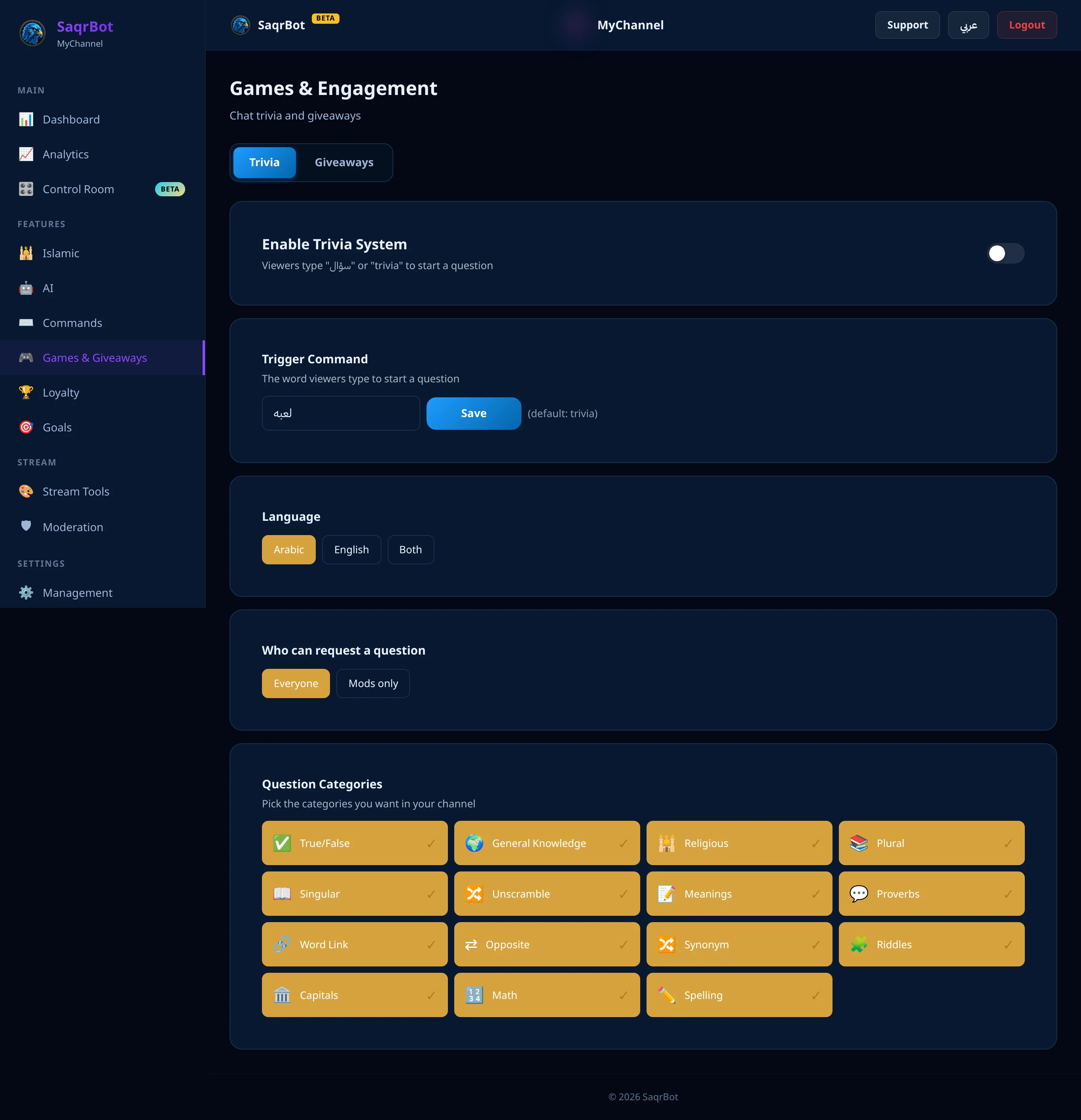
Getting Trivia live takes minutes. Connect your Twitch channel and open the dashboard (chat games are Twitch-only). Enable the Trivia system, choose categories, and set the language. Set the trigger word — default سؤال, or trivia for English channels — and optionally restrict starts to moderators. Then play: a viewer types the trigger word, SaqrBot posts a question with a 20-second timer, viewers answer in chat, and the first correct guess wins a point.
- Connect your Twitch channelConnect your Twitch channel to SaqrBot and open the dashboard. Chat games are a Twitch-only feature — the Discord bot has no games.
- Enable Trivia and pick categoriesTurn on the Trivia system in the dashboard, choose your question categories, and set the language to Arabic, English, or both.
- Set the trigger wordSet the word viewers type to start a question. The default is سؤال; English channels can set it to trivia. Optionally restrict who can start a round to moderators.
- Play in chatA viewer types the trigger word and SaqrBot posts a question with a 20-second timer. Viewers type their answer straight into chat — the first correct guess wins a point, and SaqrBot announces the winner and the answer.
Setup and Explore More
Chat games are one part of what SaqrBot does on Twitch. Go deeper with our Twitch chat bot guide (AI, moderation, games), see how the Twitch loyalty bot rewards regulars, or browse the full Twitch bot feature set. The prefix on Twitch is ! — but Trivia uses a bare trigger word you choose, not a prefixed command.
Frequently Asked Questions
What chat games does SaqrBot have on Twitch?
SaqrBot has two chat games on Twitch: Trivia and Fake News. Trivia posts a question and viewers race to answer it in chat for points. Fake News is a satirical generator that turns a recent chat message into an exaggerated breaking-news headline while you stream. Both are bilingual — Arabic and English. Chat games are a Twitch-only feature; the SaqrBot Discord bot has no games.
How does Twitch Trivia work?
A viewer types your trigger word in chat (the default is سؤال, and English channels can set it to trivia) and SaqrBot posts a question with a 20-second timer. Viewers type their answer straight into chat — no command prefix needed. The first correct guess wins a point, and SaqrBot announces the winner along with the running point total. If the timer runs out, SaqrBot reveals the answer.
How do viewers earn and track points in Trivia?
Every correct Trivia answer earns the viewer one point, and SaqrBot keeps a running total per channel. When someone wins, SaqrBot announces their new point total in chat, so the competition is visible to everyone watching. Points are tracked per viewer on your channel, turning casual questions into an ongoing leaderboard race.
What is the Fake News game?
Fake News is a satirical generator that reads recent chat messages and turns the funniest one into an exaggerated breaking-news headline, prefixed with a 📰 and written in a deadpan news-anchor tone. It runs automatically at random intervals while you are live (you set the limits and a daily cap), or you can trigger it on demand from the dashboard. It is comedy only — it skips politics, religion, insults, and anything sensitive.
Are SaqrBot's chat games on Discord too?
No. Trivia and Fake News are Twitch-only games. The SaqrBot Discord bot focuses on moderation, tickets, economy, giveaways, leveling, protection, and welcome — it has no games, no AI chat, and no music. If you want chat games, you want SaqrBot on your Twitch channel.
Are the Twitch chat games free and bilingual?
Yes. Trivia and Fake News are free, and both speak Arabic and English with correct right-to-left text — no machine-translated fallback. You choose the Trivia language (Arabic, English, or both) and your own trigger word, and everything is configured from the bilingual dashboard. Connect your channel and turn the games on in minutes.
Related Reading
Ready to add chat games to your stream?
Free. Bilingual Trivia and Fake News for Twitch, live in minutes.
Connect Twitch