A Twitch loyalty bot rewards the viewers who keep coming back. SaqrBot tracks an attendance streak of consecutive streams, counts each viewer's watch-time hours and badges, and gives XP and levels for chatting and watching — viewers check in with !streak and !watchtime, fully bilingual and configured from the dashboard.
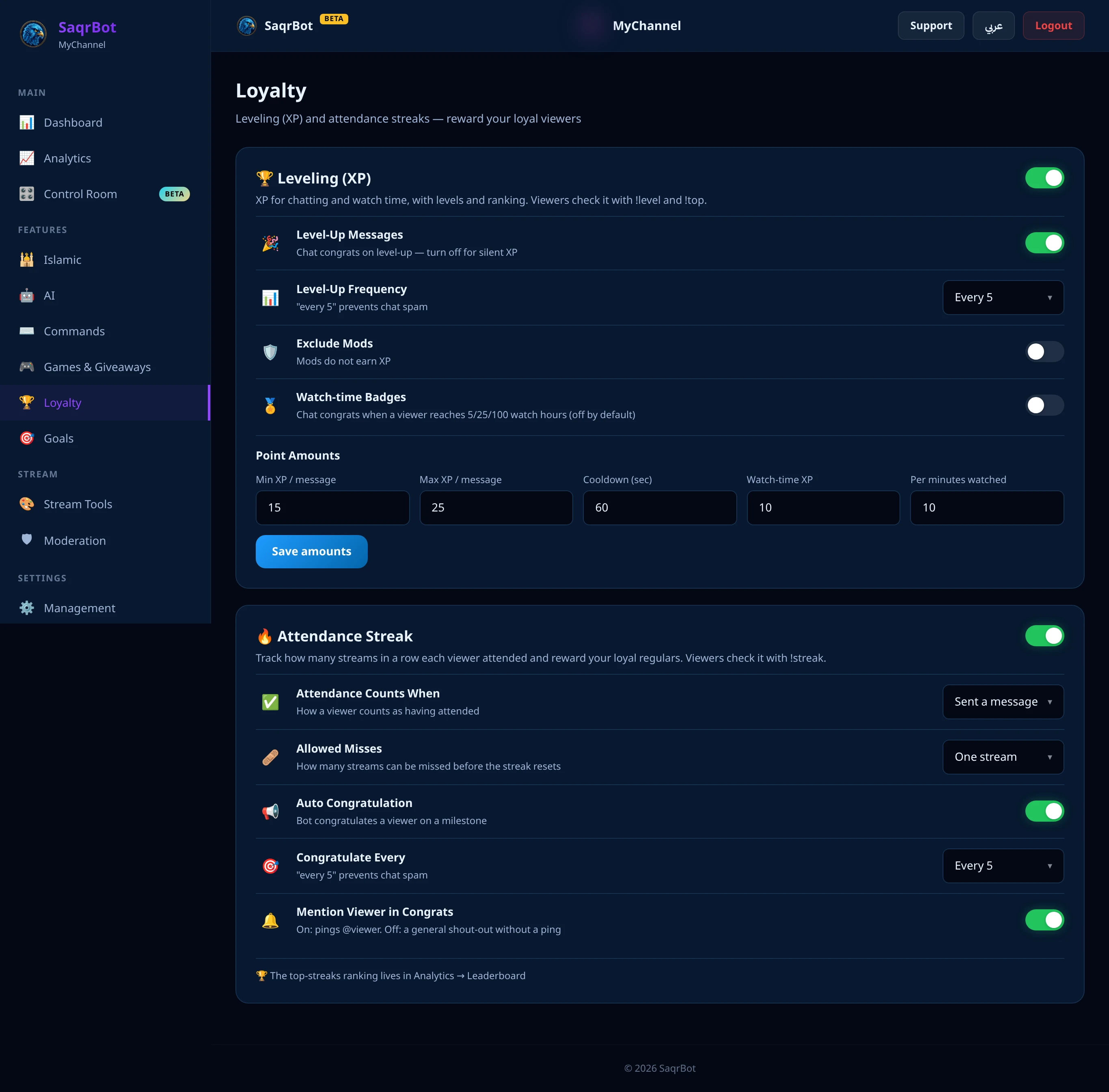
What a Twitch Loyalty Bot Does
A loyalty bot measures and rewards the habit of showing up. SaqrBot does it three ways at once: an attendance streak for consecutive streams, watch-time tracking with milestone badges, and XP and levels from both chatting and watching — turning watching into visible, competitive progress.
Attendance Streaks for Consecutive Streams
The attendance streak counts how many consecutive streams a viewer has attended. SaqrBot ties each stream to its live session, and the streak grows every stream a viewer shows up for. Allow a grace of missed streams before it resets, post a milestone shout-out in chat, and let viewers check their run with !streak.
Watch-Time Hours and Milestone Badges
SaqrBot tracks each viewer's watch-time hours and rewards milestones with badges — chat congratulations when a viewer crosses 5, 10, 25, 50, 100, 250, 500, and 1000 watch-hours. Badges are a dashboard toggle, off by default. Viewers check their total and rank with !watchtime.
XP and Levels From Chat and Watch Time
Under the streaks and badges sits an XP and leveling system that rewards two kinds of loyalty: chatting and watching. Viewers earn XP for both, building levels — so streaks reward consecutive attendance, badges reward total hours, and XP rewards everyday participation. Every loyal viewer gets recognized.
How to Set Up Your Twitch Loyalty Bot
Everything is configured from the bilingual dashboard — no code, and no separate loyalty service. Here's the quick path:
- Connect your Twitch channelSign in to the SaqrBot dashboard with Twitch and connect your channel so the bot can read who is in chat and track stream sessions.
- Enable the attendance streakOpen the loyalty settings, turn on the attendance streak, and set the grace for missed streams and the milestone interval for the shout-out.
- Turn on watch-time badgesToggle watch-time badges on (they are off by default) so the bot congratulates viewers in chat when they reach 5, 10, 25, 50, 100, 250, 500, and 1000 watch-hours.
- Keep XP and leveling runningLeave chat and watch-time XP enabled so viewers earn levels for showing up and chatting, building the loyalty ladder.
- Share the commands with your chatTell your viewers to use !streak to see their consecutive streams and !watchtime to see their hours and rank — the prefix is ! on Twitch.
Explore More
To go deeper, see the full Twitch bot feature set, track your growth with the Twitch stats bot, or read how SaqrBot works as a Twitch chat bot with AI replies, moderation, and games. The command prefix on Twitch is !.
Frequently Asked Questions
What is a Twitch loyalty bot?
A Twitch loyalty bot rewards the viewers who keep coming back. SaqrBot tracks an attendance streak of consecutive streams a viewer shows up for, counts each viewer's watch-time hours, hands out watch-time badges at milestones, and gives XP and levels for chatting and watching. Viewers check their progress with !streak and !watchtime, and everything is bilingual Arabic and English and configured from the dashboard.
How does the Twitch attendance streak work?
The attendance streak counts how many consecutive streams a viewer has attended. SaqrBot ties each stream to its live session, and a viewer's streak grows every stream they show up for. You can allow a grace of missed streams before the streak resets, so a viewer who misses one stream doesn't lose everything. At milestone intervals SaqrBot posts a shout-out in chat, and viewers check their own with !streak.
What are watch-time badges on Twitch?
Watch-time badges are chat congratulations SaqrBot posts when a viewer crosses a watch-time milestone: 5, 10, 25, 50, 100, 250, 500, and 1000 watch-hours. They are a dashboard toggle and are off by default, so you turn them on when you want SaqrBot to celebrate your long-time watchers automatically in chat.
How do viewers check their watch time and rank?
A viewer types !watchtime (or !وقتي in Arabic) and SaqrBot replies with their total watch-time hours and their rank among your channel's viewers. It turns passive watching into a friendly race, and because it is bilingual the reply matches your channel's language.
Is the SaqrBot Twitch loyalty bot free?
Yes. Attendance streaks, watch-time hours and badges, and chat and watch-time XP are all free. Connect your channel, enable the loyalty features from the dashboard, and your viewers start earning streaks, hours, and levels right away — no separate loyalty service needed.
How do I set up the loyalty features?
Connect your Twitch channel to the SaqrBot dashboard, enable the attendance streak and set the grace and milestone interval, toggle watch-time badges on, and keep XP and leveling running. Then tell your chat to use !streak and !watchtime. Everything is configured from the bilingual dashboard with no code.
Related Reading
Ready to reward your loyal viewers?
Free forever. Streaks, watch-time badges, and XP, in minutes.
Connect Twitch