A Discord Arabic word filter needs to catch more than an exact list of banned words, because Arabic spelling tricks — an extra ة, stretched تطويل, spaces between letters, or a clitic like وا/يا/ه stuck to the word — defeat an English-style keyword match instantly. SaqrBot's word filter normalizes Arabic before it compares: it strips tashkeel, tatweel and zero-width characters, collapses repeated letters, folds alef/ya/ta-marbuta variants, and still tells a real hit from a coincidence, so هاتف stays clean next to a filtered تف. It's free, off by default, with a delete, warn, timeout, kick or ban penalty and a dashboard box to test a sentence before you turn it on.
Why an English-style filter misses Arabic
Most Discord word filters were built for English: they compare a message to a list, sometimes as a whole word and sometimes as a substring. Arabic breaks that comparison in ways English rarely faces. A member can write حرام as حــرام (tatweel), حرااام (repeated letters), حرام with a stray tashkeel mark, ح ر ا م with a space between every letter, or swap the final ة for ه — five different strings that are the same word to a human reader, and five different strings to a filter that only checks for an exact substring.
What the filter normalizes before it compares
Before SaqrBot compares a message to your word list, it runs the same normalization an Arabic reader does automatically:
- Removes tashkeel (diacritics) and tatweel (the stretching dash ـ).
- Collapses repeated letters, so حرااام reads the same as حرام.
- Folds alef variants (أ إ آ) to ا, ى to ي, and ة to ه.
- Strips zero-width characters and bidi control marks that are invisible in chat but break a plain-text match.
- Converts Arabic presentation forms and full-width letters back to their normal shape.
- Reads letters typed with a space between each one, like ح م ا ر, as one word — once at least 4 letters are joined that way.
Whole word by default, and why contains mode needs 4 letters
Every term matches as a whole word by default: the filter compares full tokens (plus the handful of Arabic prefixes and suffixes below), not a fragment buried inside another word. You can switch a specific term to contains mode to catch it anywhere in a message, including inside a longer word — but SaqrBot refuses to save a contains term shorter than 4 letters. The reason is simple: a 2-letter term like تف sits inside dozens of innocent words, starting with هاتف (phone). In whole word mode, تف only matches when it stands alone; in contains mode with no length floor, it would flag half the dictionary.
Arabic prefixes and suffixes stay caught, unrelated words stay clean
Arabic sticks small words directly onto a word instead of leaving a space: والكلب means and the dog, يالكلب is a call to a dog, and كلبه means his dog — three real sentences a member might actually type. A filtered term still matches through a short, known list of prefixes (و ف ب ل ك ال وال فال بال كال لل يا يال) and suffixes (ه ها هم هن ك كم كن ي ين ات ون), so a term like كلب catches يالكلب, والكلب, كلبه and بالكلب alike. What it will not do is flag a word that only looks similar: مكلب, تكلب, كلبت and كلبس are different words with different letters attached, and هاتف, قلب and مكلب never match a filtered كلب or تف — the letters have to be the term itself plus one of those known attachments, nothing else.
Enforce or monitor, and a penalty ladder on top
Turn the filter on in Enforce mode to delete a matching message immediately, or in Monitor mode to log matches without deleting anything while you tune your word list. On top of the delete you can add one penalty: Warn (which goes through your server's normal warning ladder, so a repeat offender still escalates the way any other warning does), a timed Timeout, a Kick, or a Ban. The server owner, Administrators, members with Manage Server and the bot itself are always exempt, and you can add specific roles or channels to the exemption list — a channel exemption also covers every thread under that channel.
Test a sentence before you turn it on
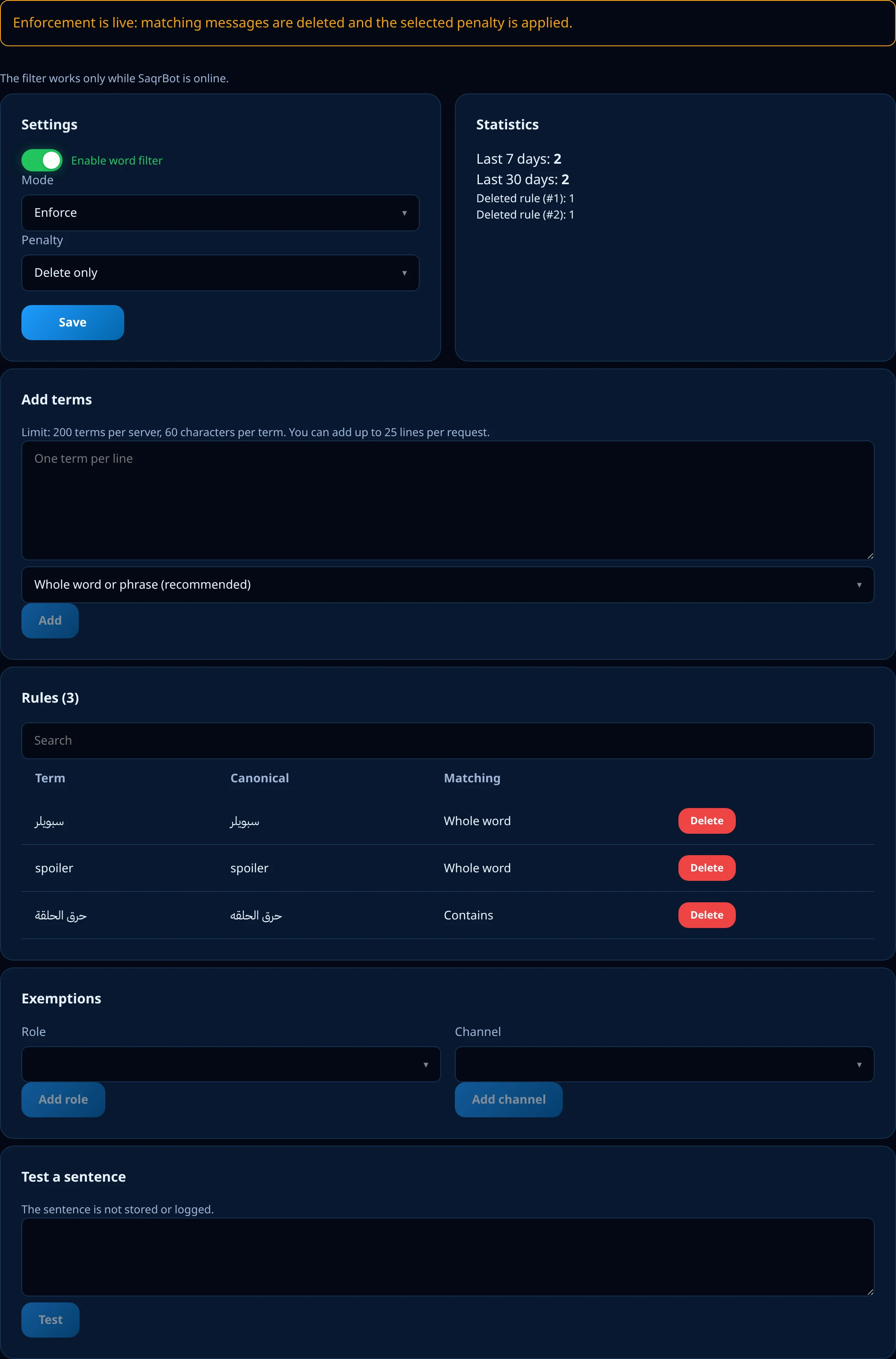
Before you enable enforcement, the dashboard's Word filter tab has a Test a sentence box: type a sentence, and SaqrBot tells you whether it matched, which term matched, and through which mode — whole word, contains, or a clitic/spaced-letters match. The sentence is never stored or logged, so you can safely test with the actual words you're worried about.
Every match is logged, in the dashboard and in Discord
Every deletion is recorded with its reason on the dashboard's Protection Logs tab, and if you've set a Discord log channel the same match is posted there too — see the Discord logging bot guide for how to pick that channel. Nothing about a word filter match is silent: you can always see what was caught, when, and why.
How to set up the Arabic word filter
- Open the dashboard, go to Protection, and turn on Word filter — it's off until you enable it.
- Add up to 200 terms (each up to 60 characters), choosing Whole word or Contains for each one.
- Pick a mode, Enforce or Monitor, and a penalty on top of the delete: none, Warn, Timeout, Kick or Ban.
- Exempt any trusted roles or channels — for example your staff role, or a channel where members quote things for context.
- Use Test a sentence to check real examples before you switch the mode to Enforce.
An Arabic-first filter vs a filter built for English
A word filter built for English checks a message against a list, as a whole word or a substring — it has no reason to look for tashkeel, tatweel, Arabic clitics, or letters typed with spaces between them, because English does not have any of that. That's not a flaw in those bots; it's a different language's problem that was never on their list. SaqrBot's filter exists because an Arabic-first community needs that normalization by default, not as something you have to build yourself.
Limits to know before you start
- Up to 200 terms per server.
- Each term is 2 to 60 characters; a Contains-mode term needs at least 4.
- Whole word by default; Contains is opt-in, per term.
- Free, and off by default until you enable it.
Related Reading
The word filter is one more layer next to Discord server protection. Pair it with the full Discord moderation bot for the warning ladder it escalates through, and route its alerts with the Discord logging bot guide.
Frequently Asked Questions
What is a Discord Arabic word filter?
It's a per-server list of banned words that SaqrBot matches after normalizing the message: stripping tashkeel, tatweel and invisible characters, folding letter variants, and still catching a word wearing a common Arabic prefix or suffix.
Is SaqrBot's word filter free?
Yes. It's part of the free Protection page on the dashboard, off by default until you turn it on.
Why does contains mode require at least 4 letters?
A shorter fragment sits inside too many innocent words — a 2-letter term like تف is already part of هاتف (phone). Whole word mode has no such limit because it only matches a full token.
Will the filter catch a word hidden inside another word?
Only if you set that term to contains mode. In the default whole word mode, a term only matches on its own or with a recognized Arabic prefix or suffix, so a coincidental word like هاتف or قلب never triggers a filter on كلب or تف.
What happens when the filter finds a match?
The message is deleted in Enforce mode, or just logged in Monitor mode, and you can add one extra penalty: Warn, Timeout, Kick or Ban. The server owner, Administrators, members with Manage Server and the bot itself are always exempt, and you can exempt specific roles or channels too.
Can I test a word before enabling the filter?
Yes — the dashboard has a Test a sentence box that tells you whether a sentence matches, which term, and how, without saving or logging anything you type.
Add a free Arabic-aware word filter
Catches spelling tricks, not just exact words — with delete, warn, timeout, kick or ban.
Add to Discord