A Twitch goals bot gives your channel something to climb toward — a follower or sub milestone, a stream-hours target, an average-viewer push. SaqrBot reads your real Twitch numbers, announces 25/50/75/100% milestones in chat, and shows a live goal-bar overlay in OBS — bilingual and free.
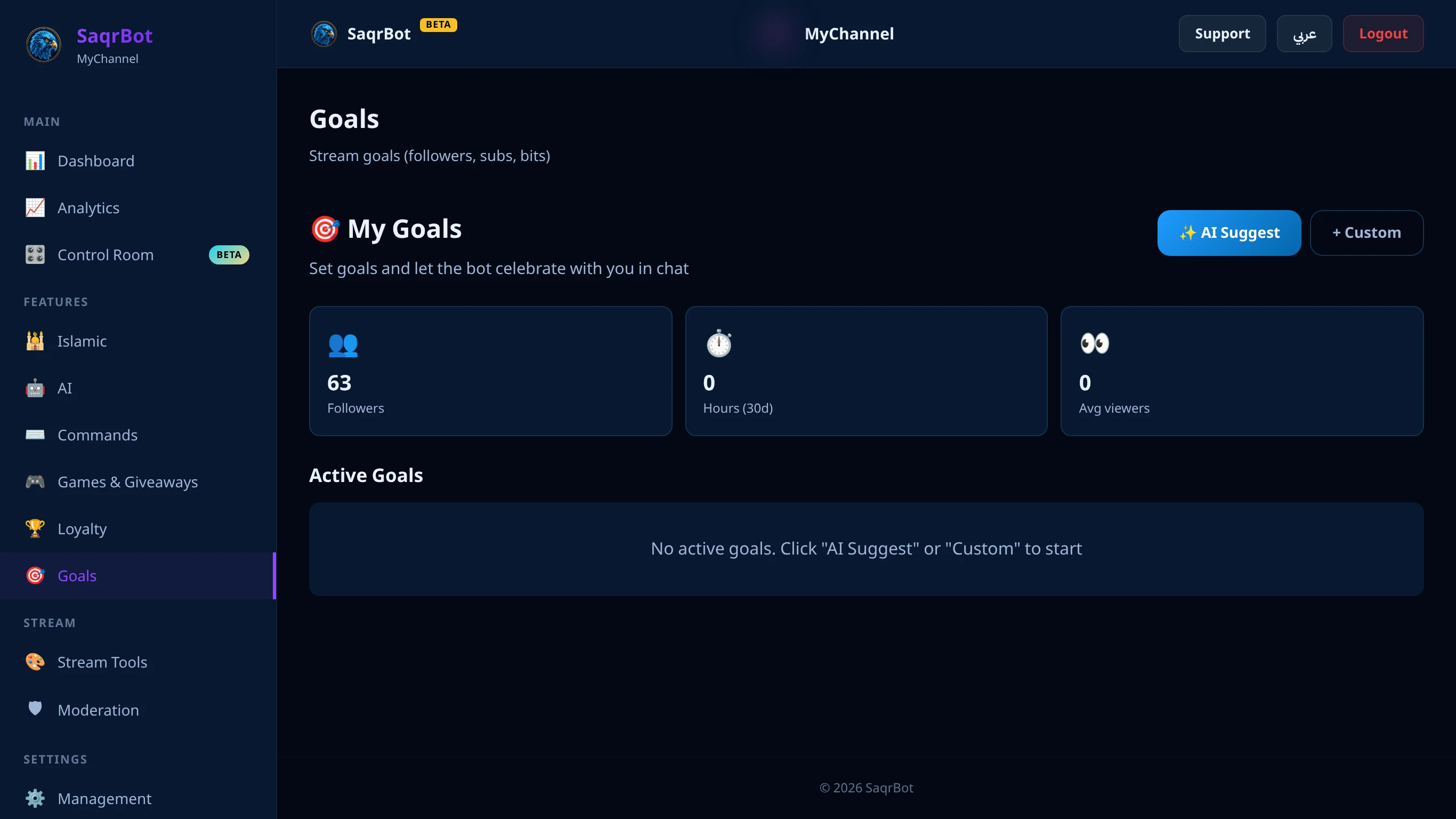
What a Twitch Goals Bot Does
A Twitch goals bot turns ambition into a tracked target. SaqrBot reads your real numbers — followers and subs straight from Twitch, plus stream hours and average viewers from recent stats — and measures progress from the moment you create the goal, re-checking each active goal on a schedule.
The Goal Types It Tracks
SaqrBot tracks four goal types: followers (your live Twitch total), subs (your subscriber count), stream hours (how long you've gone live recently), and average viewers (average concurrent audience across recent streams). Set a target and an optional deadline; current numbers form the starting line.
Milestone Announcements in Chat
SaqrBot posts a milestone message when a goal crosses 25%, 50%, 75%, and 100% of its target — a great-start nudge, a halfway shout, a final push, then a celebration. Messages are bilingual in your channel's language; toggle them per goal, and a goal is marked complete automatically at 100%.
The Goal-Bar Overlay for OBS
The goal-bar overlay reaches everyone watching the video. SaqrBot offers a goal-bar overlay widget you add to OBS as a browser source: a live progress bar for a follower or sub goal, filling in real time. You control the label, colors, font, and position. Pair it with chat milestones for both sides — chat and screen.
Setting a Goal — Step by Step
Setting up a goal takes a couple of minutes from the bilingual dashboard:
- Connect your channel and open the Goals section of the Twitch dashboard.
- Pick a goal type — followers, subs, stream hours, or average viewers — or ask SaqrBot to suggest easy, medium, and ambitious targets from your current stats.
- Set the target and deadline — enter the target value and, optionally, a deadline in days; SaqrBot reads your current value as the starting point.
- Keep chat milestones on so SaqrBot posts at 25%, 50%, 75%, and 100% in your channel's language.
- Add the goal-bar overlay to OBS as a browser source to show a live progress bar of your follower or sub goal on stream.
Setup and Explore More
Connect your channel, open the Goals section, set a target, and SaqrBot tracks it for you. Go deeper with the full Twitch bot feature set, our Twitch alerts guide, or the Twitch stats bot guide. Twitch commands use the ! prefix.
Frequently Asked Questions
What is a Twitch goals bot?
A Twitch goals bot tracks a target for your channel — like a follower or sub milestone — and shows the progress toward it. SaqrBot lets you set follower, sub, stream-hours, or average-viewer goals from the dashboard, checks your real numbers automatically, announces 25%, 50%, 75%, and 100% milestones in chat, and can display a live goal-bar overlay in OBS — all bilingual and free.
What goal types can SaqrBot track?
SaqrBot tracks four goal types: followers, subs, stream hours, and average viewers. Follower and sub goals read your real Twitch totals, stream-hours and average-viewer goals are computed from your recent stream stats. You set a target value and an optional deadline for each goal, and SaqrBot measures progress from where you stand the moment you create it.
How does SaqrBot announce goal progress?
SaqrBot checks each active goal on a schedule and posts a chat announcement when it crosses 25%, 50%, 75%, and 100% of the target — for example a halfway-there message, then a celebration when the goal is hit. The messages are bilingual and fire in your channel's language. You can toggle chat announcements on or off per goal, and a goal completes automatically when it reaches 100%.
Is there a goal overlay for OBS?
Yes. Alongside chat milestones, SaqrBot offers a goal-bar overlay widget you add to OBS as a browser source. It shows a live progress bar for a follower or sub goal — with your own colors, label, and position — so viewers watching the stream can see how close you are to the target in real time.
Can SaqrBot suggest Twitch goals for me?
Yes. From the Goals section you can ask SaqrBot to suggest three targets based on your current channel stats — an easy goal, a medium one, and an ambitious one — each with a sensible deadline. Pick the one you like and it becomes an active goal in one click, or set your own target manually instead.
Is the SaqrBot Twitch goals bot free?
Yes. Goals, milestone chat announcements, AI goal suggestions, and the goal-bar overlay all ship with SaqrBot for free, fully bilingual. Connect your channel, open the Goals section of the dashboard, set a target, and SaqrBot starts tracking it for you.
Related Reading
- Twitch Alerts Bot — subs, raids & bits
- Twitch Stats Bot — track your whole channel
- SaqrBot for Twitch — all features
Ready to set a Twitch goal?
Free forever. Follower and sub goals, chat milestones, and a goal-bar overlay — in minutes.
Connect Twitch