A Discord temporary voice channel bot auto-creates a personal voice room the moment a member joins a hub channel, makes them its owner, and deletes the room automatically when it empties. With SaqrBot's free join-to-create temp voice you set one hub channel and get endless rooms with zero manual cleanup.
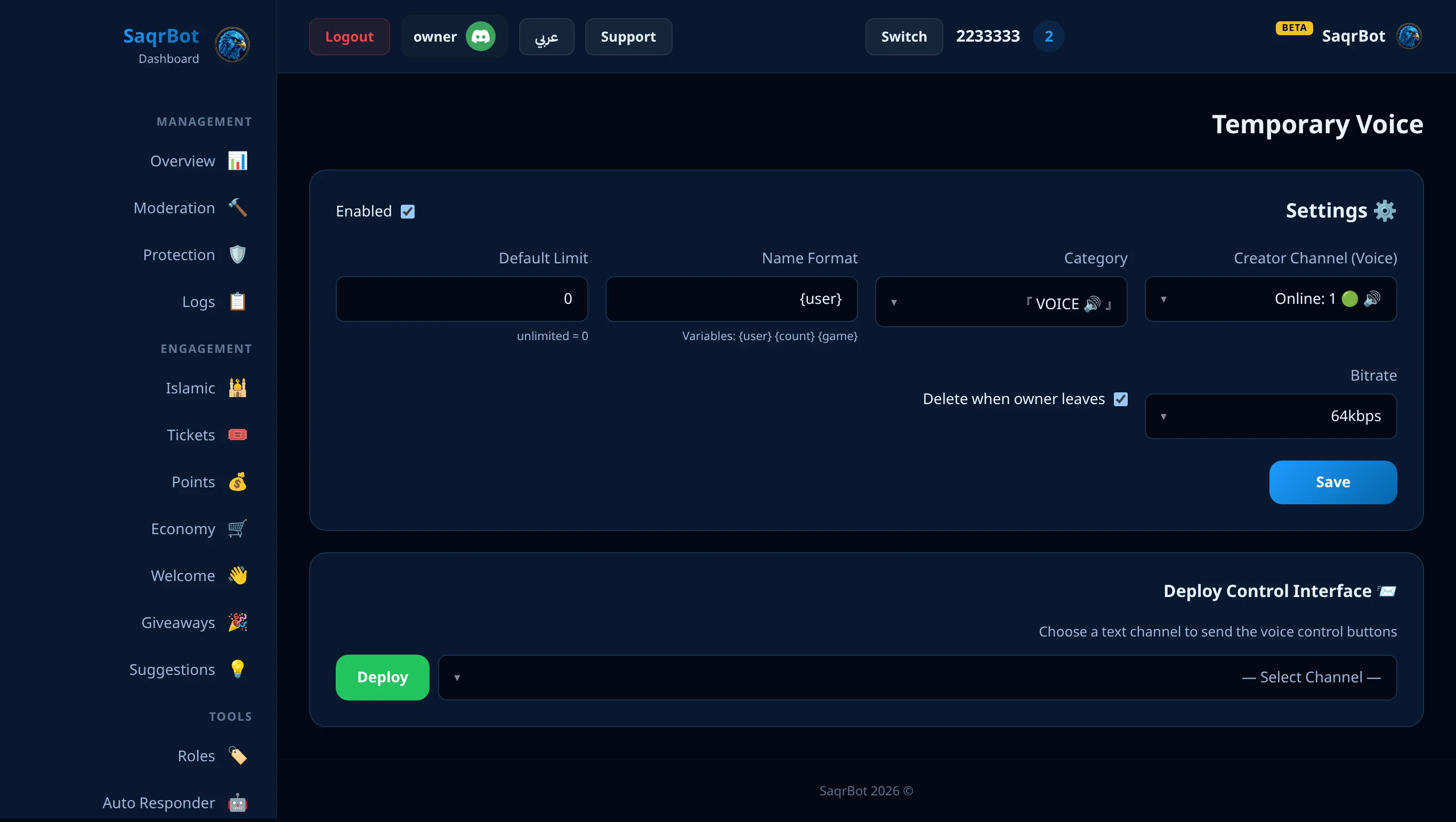
A Discord temporary voice channel auto-creates on join and auto-deletes when empty.
How Auto Voice Channels Work
Set one hub channel — the bot creates an owned personal room on join and deletes it when empty.
Owner Control Panel (Buttons & Modals)
Owners manage the room from a button-and-modal panel: rename, user limit, lock/unlock, permit, kick/ban, and transfer ownership — no slash command.
Multiple Hubs — Up to 10 Per Server
SaqrBot lets you set up to 10 join-to-create hubs per server, each with its own channel, category, naming format, default limit and bitrate — managed from the Temp Voice dashboard page.
One-Minute Setup for Temp Voice
One-minute setup from the dashboard, then members self-manage their rooms.
Why Your Server Needs Temp Voice
More voice activity, cleaner server, zero admin work.
How to set up a Discord temporary voice channel bot
Add SaqrBot
Add SaqrBot to your server, then open the Temp Voice setup in the Discord features dashboard.
Pick the hub channel
Choose the voice channel that acts as the join-to-create hub — the channel members join to spawn their own room.
Set the category and naming
Pick the category where new rooms appear and choose a naming format for the auto-created channels.
Set the default user limit
Set the default user limit (0 = unlimited). The bot then handles creation, cleanup, and permissions automatically while members manage their own rooms from the owner panel.
Frequently Asked Questions
What is a Discord temporary voice channel?
A Discord temporary voice channel is a voice room the bot creates on demand and deletes when it empties, so your sidebar never fills with dead channels. With SaqrBot you set one hub channel: the moment a member joins it, the bot spins up a personal voice channel, moves them in, and makes them its owner — and removes it when the last person leaves.
How do join-to-create voice channels work?
You designate one voice channel as the hub. When any member joins it, the bot instantly creates a new personal voice channel for them, moves them into it, and assigns them ownership. When the last person leaves, the bot deletes the channel automatically — so every room is owned, scoped, and cleaned up on its own.
How do I control my temporary voice channel?
The member who created the channel becomes its owner and manages it from a button-and-modal control panel — no slash command to memorize. From the panel the owner can rename the channel, set a user limit, lock or unlock it, permit a specific member, kick or ban a member, and transfer ownership to someone else.
How do I set up temp voice channels?
Setup takes under a minute. Add SaqrBot, then from the Discord features setup pick the hub channel, set the category where new rooms appear, choose a naming format, and set the default user limit. The bot handles creation, cleanup, and permissions automatically, and members manage their own rooms from the owner panel.
Can I have more than one hub channel?
Yes. SaqrBot supports up to 10 join-to-create hubs per server, each with its own hub channel, target category, naming format, default user limit and bitrate.
Is the temporary voice channel bot free?
Yes. SaqrBot's temp voice is free forever with no premium locks, and it comes bundled with 15+ other systems under one bilingual web dashboard — so one bot and one role run temp voice alongside moderation, welcome, leveling, and more, in English or Arabic.
Related
Related reading links, plus the Discord bot overview.